


You can use tables to specify film coefficients and/or ambient temperatures for convection boundary conditions. Because these inputs are independent, you can mix and match tables with other ways to specify their magnitude. For example, you can specify film coefficient with a table and ambient temperature with a constant value.
Create a table of ambient temperature or film coefficient values.
Temperature or Film Coefficient must be a dependent variable.
A table can include both film coefficient and temperature as dependent variables, but only the relevant one is used. For example, if you use the table to specify the ambient temperature, the solver ignores any film coefficient values.
If the film coefficient varies by temperature, the independent variable must specify how the temperature is measured: Average Film Temperature, Bulk Temperature, Surface Temperature, or Difference of Surface and Bulk Temperature. You cannot use Temperature as an independent variable in a film coefficient table.
Tables can only include one temperature-related independent variable.
For more information about independent and dependent variables in convection tables, see Create a Table.
Select Convection as the Steady-State Thermal analysis type.
Select the desired Scoping Method for the boundary condition.
To specify the film coefficient with a table, click the Film Coefficient field and select the name of the table from the drop-down menu. The menu only lists tables that include film coefficient as a dependent variable. For example, in the screen shot below, the Film Coefficient menu lists two tables:
, which includes film coefficient as a dependent variable and bulk temperature as an independent variable
, which includes both film coefficient and ambient temperature as dependent variables
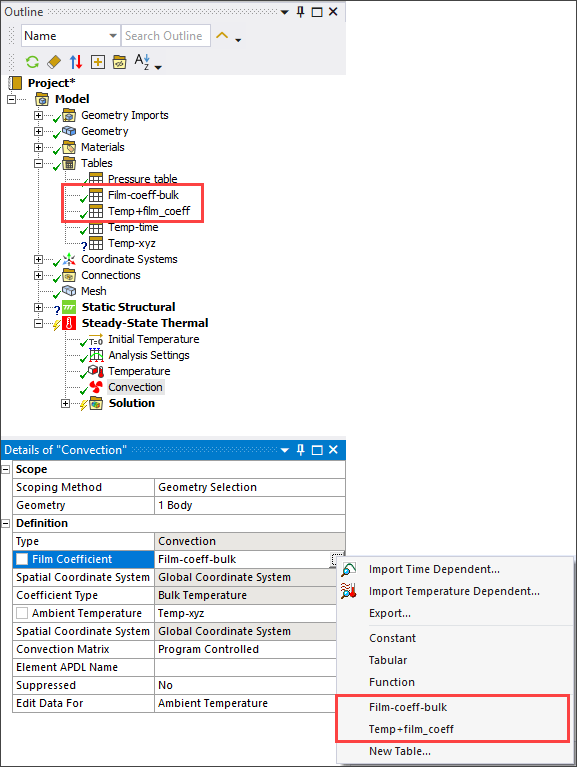
If the model does not contain a table of film coefficient values, you can manually create a new table by selecting . The Mechanical application automatically creates a table with Film Coefficient as the dependent variable and Time as the independent variable. Enter data into the table as described in Manually Enter a Table . The new table is then listed on the drop-down menu and can be assigned as the film coefficient magnitude.
To specify the Ambient Temperature with a table, follow the previous two steps. Tables that contain Temperature as a dependent variable are listed on the menu and can be used to specify the ambient temperature.
Check the box next to Film Coefficient or Ambient Temperature to parameterize one or both of these tables. This enables you to perform design point studies with different tables of film coefficient and/or ambient temperature data. For details, see Table Parameters and Design Points in the Workbench User's Guide.
If the table contains spatial coordinates (X Coordinate, Y Coordinate or Theta Coordinate, Z Coordinate) as independent variables, the Spatial Coordinate System shows the coordinate system used by the table. For more information, see the discussion of spatial coordinate systems under View Table Details.
The Coefficient Type field displays the type of independent temperature variable that is contained in the table (if applicable). In this example, the value of the film coefficient depends on the Bulk Temperature.
If the table contains Time as an independent variable, specify the start time for displaying the load data in Graphics Controls.