


An EasyFlex Body feature simplifies the process of integrating flexible bodies into multibody dynamics simulations by using a meshfree method. Unlike the FE Body, this feature allows for flexibility in any CAD-derived rigid body without requiring meshing. This capability makes it easy to define flexible bodies, improves the modeling workflow, reduces time requirements, and ensures accurate depiction of flexibility's impact on system behavior. An EasyFlex Body is useful for projects with frequent geometric changes or complex geometries that pose meshing challenges.
An EasyFlex Body can be classified into two types:
- Nodal EasyFlex Body
Utilizes the full degrees of freedom of nodes, which are specific to each body type, for detailed flexibility analysis.
- Modal EasyFlex Body
Uses the modal synthesis method with modal data obtained from the modal analysis of a Nodal EasyFlex Body.
Note: The EasyFlex Body is only supported in the Motion standalone preprocessor.
A nodal EasyFlex body represents a flexible body with full degree of freedom of nodes. It is modelled by changing the body type of a solid or assembled body to EasyFlex Nodal in the Motion standalone preprocessor. The degrees of freedom of the nodal EasyFlex body are determined by the number of nodes. This type of flexible body is suitable for representing large and local deformations, as well as contact problems. Unlike an FE body, an EasyFlex Nodal body does not require a mesh to function. The flexible body can be modelled on your system using only CAD without any additional work.
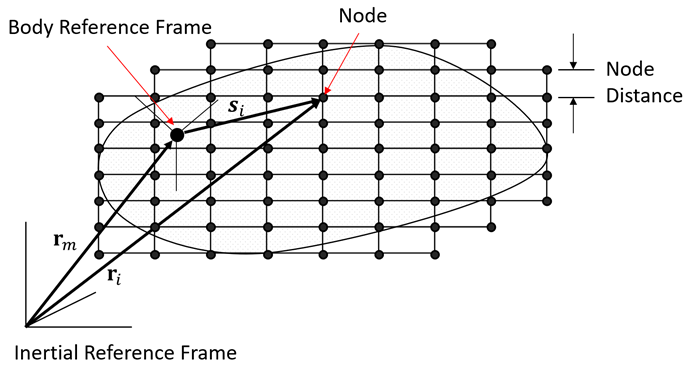
A Nodal EasyFlex Body consists of multiple nodes, each representing deformation, stiffness, and mass, as shown in the figure above. The number of nodes is established by setting the maximum permissible distance between them. Internally, a Cartesian mesh is generated, functioning similarly to an FEM mesh. The nodal mass of the EasyFlex body is computed based on the body mass defined in the CAD kernel. The equation of motion for a nodal EasyFlex body mirrors that of a nodal FE body and is formulated to include both inertia and elastic forces (refer to Equations of Motion for a Nodal FE Body for details).
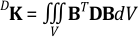
The stiffness matrix of a node is assembled by combining it with the stiffness matrix of the finite element, using the Cartesian mesh, which can be calculated as follows.
 | (3–56) |
where:
 = partial derivative of the shape function = partial derivative of the shape function |
 = strain-stress relationship = strain-stress relationship |
The nodal strain and stress can be calculated in the same way as for a Nodal FE Body.
This configuration is used by the solver to set the geometry type of the Nodal EasyFlex body. If Solid is selected, the solver considers the stiffness to be slightly harder. If Shell or Beam is chosen, the stiffness is considered slightly softer.
The level setting adjusts the node distance used by the solver. This distance affects the number of nodes, which in turn determines the accuracy of the stiffness and mass matrices. For eigenvalue analysis, only the higher level is considered by the solver.
The scale setting allows adjustment of the node distance for each component. The new node distance is calculated by multiplying the scale value by the original node distance.
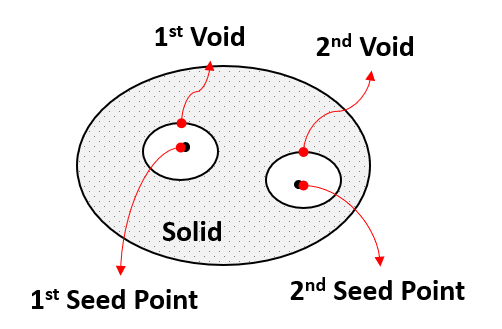
Seed points are defined to identify the voids within solid geometries, as illustrated below. When a solid geometry contains multiple voids, a corresponding seed point must be defined for each void. The solver uses these seed points to recognize and handle the voids of a solid geometry properly.
A Modal EasyFlex Body is a flexible body that uses modal coordinates to reduce the number of degrees of freedom compared to the nodal EasyFlex body. To model this body type, change the type of a solid or assembled body to EasyFlex Modal in the Motion standalone preprocessor. The degrees of freedom are determined by the number of modes.
To use a body as an EasyFlex Modal, you must perform a body eigenvalue analysis on the target body using the Motion standalone preprocessor. The preprocessor converts the rigid body into a nodal EasyFlex body and conducts a modal analysis to obtain the mode shapes. These mode shapes are then used to model flexibility through modal synthesis. A modal EasyFlex body does not require meshing for modal analysis, unlike a modal FE body.
After obtaining modal data, the formulations for the modal EasyFlex body are the same as those for a modal FE body. See Formulations of a Modal FE Body for more information.