


The Structural Optimization analysis supports certain structural results, including Deformation, Stress, and Strain, etc.
Important: Stress- and strain-based results are not supported for the method.
Note: Optimized structural results are displayed on a triangle-based surface-mesh.
Application
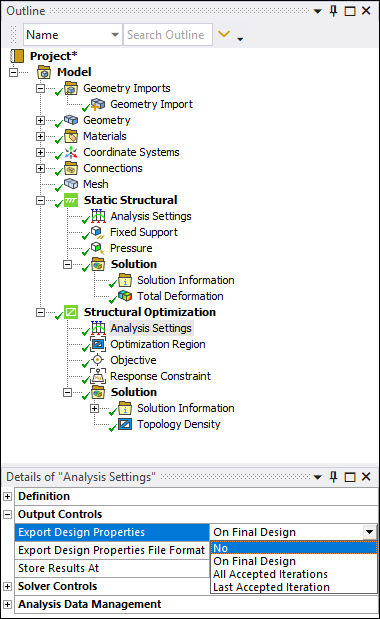
Set the Export Design Properties property (shown below) to a desired option. This property is included in the Output Controls category of the Analysis Settings object. See the Specify Analysis Settings section for a description of the options based on the selected optimization method. This property is available for all optimization methods.
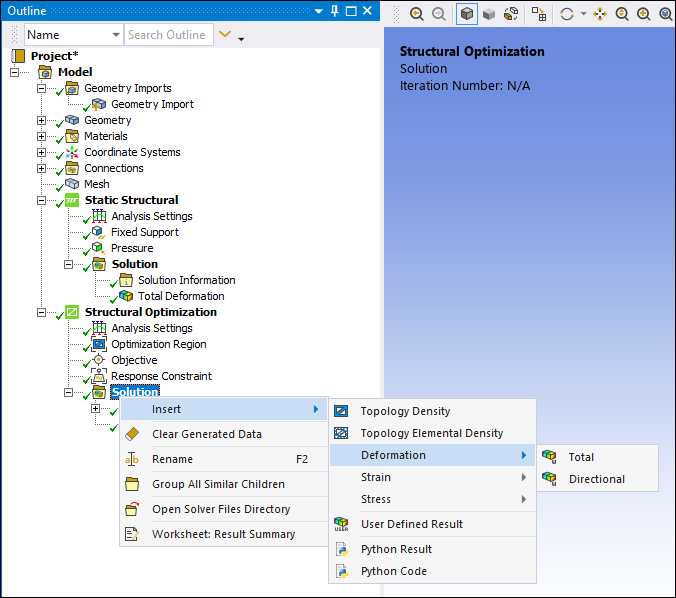
Insert results from the appropriate menu (Deformation, Stress, or Strain) on the Solution tab or using the context (right-click) menu options on the Solution object.
Deformation Result Menu
Stress and Strain Result Menus
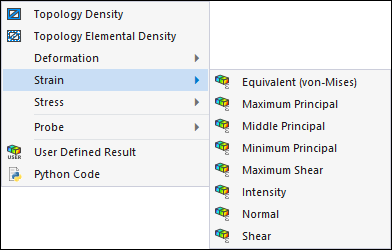
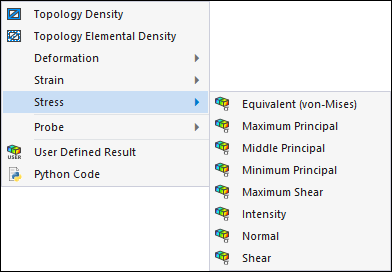
Once you have specified a result, you specify the properties as you normally would (see results object reference), except there are the following properties with specific requirements for Structural Optimization:
Environment Selection: You use this property to select the upstream system from which the result obtains data.
Set Number: This option displays the contour result for a given Result Set contained in the result file. By default, this value is the last set. If only one set is available, then that is the specified Result Set. For a solution that includes load steps and modes, you specify the desired set using the Set Number property (see Result Set Listing).
Iteration: This property displays the result set from which the result was obtained. Contours for the result are based on the data of the iterations. By default, this value is the last iteration. If only one iteration is available, then that is the specified Iteration. To obtain other iterations, set the Export Design Properties property to .