


All Ansys products use the same Ansys license manager: support for this licensing is built into EnSight, providing a more streamlined installation and usage path. This is the recommended use case for EnSight; your current EnSight licensing should be migrated to this Ansys licensing and away from the legacy SLiM licensing. Contact your Ansys representative for assistance with licensing Ansys products.
The SLiM translator writes log files into the CEI/license8/ folder.
The SLiM translator service may fail when using Windows Services
if it does not have permission to write to that folder. The current workaround is to allow
write access to the CEI/license8/ directory or change the service's
start parameters to add -l DIRNAME to specify a folder where logs
should be written.
Background
EnSight and related tools run on all three major desktop platforms: Windows, Linux, and macOS. Since Ansys licensing is supported only on Windows and Linux, another solution was required to support macOS. Before CEI was purchased by Ansys in 2017, it used an in-house licensing system called SLiM (simple license manager) across all three platforms. From 2017-2021, Ansys continued to support SLiM as the primary licensing mechanism for macOS (and as a backup licensing mechanism on Windows and Linux).
As of the 2021 R2 release, it was desired to retire SLiM as a licensing mechanism and move entirely to Ansys licensing. This document details the SLiM-to-Ansys licensing translator that we developed to continue to support macOS as a platform.
SLiM Translation Daemon
The slimd8 (or slimd8.exe on Windows) daemon serves the role of SLiM server, listening on a socket for SLiM clients and serving those licensing requests. In prior releases, it had a key file that defined what features it was responsible for and how they should be handled (what client machines were valid, what time periods were covered, etc.)
The new slimd8 (or slimd8.exe on Windows) in 2021 R2 looks the same to SLiM clients. It sits on the network, waiting to serve client requests. But instead of checking an internal database of features, it instead forwards feature requests to an Ansys license manager. The underlying SLiM network protocol has not changed, allowing even older clients to operate with the new SLiM "translation" daemon. This also means that the new slimd8 no longer reads SLiM key files since there is no longer a concept of an internal feature database to manage.
SLiM Features and Ansys Licenses
Though the SLiM daemon can manage features of any name (and there are many in SLiM
history), only certain feature names are translated when talking to the Ansys license
manager. All other feature names are rejected. The valid feature names are
ensight, ensightgold, cfd_preppost, and
envisionpro. We could add to the list in the future should licensing demands
require it, but these are the license names currently supported in 2025 R1.
Note: As of 2021 R2, there is no explicit Ansys license increment for EnVision Pro. What
the SLiM translator daemon does with an envisionpro feature request is
check for the existence of EnSight, EnSight Enterprise, or CFD PrepPost at the
Ansys license server. If any of those exist as capabilities at the license
manager, no matter how many are currently checked out, EnVision Pro is allowed.
SLiM continues to support a heartbeat concept, with the SLiM translator daemon expecting to hear back from every SLiM client it has issued a license to every so often. By default, it assumes that clients will check in at least every 10 minutes. If the translator does not hear back from a client, it internally marks its license as having temporarily timed out. If the client reappears in time, the license is marked as being okay. However, at the top of every hour, the translator will check in any licenses that are still marked as timed out. If, perchance, the client reappears after the license has been checked back in, the SLiM translator will attempt to check the license back out but runs the chance of having that license no longer available at the Ansys license manager. In this case, the client will be denied the re-checkout.
SLiM continues to support server redundancy. If multiple SLiM servers are set up, a SLiM client (like EnSight) that is configured to see multiple servers will try them in order. If the first server does not accept the connection, the client will automatically progress to the second, and so on.
SLiM Configuration and Operation
The existing bin/slimd8_* scripts operate with the new SLiM daemon, except that any SLiM key file argument has been removed. Thus, slimd8_start will check if an old process is around, kill it if so, and then starts a new SLiM translation daemon. The slimd_status script works the same as it did before. The slimd8_stop script also operates without changes.
The SLiM translation daemon is configured using two environment variables, SLIMD8_SERVERS and ANSYSLMD_LICENSE_FILE.
SLIMD8_SERVERS: This environment variable is the same as it has been for SLiM. It has the format machinename:port#. For example,
apxlnxbuild01.ansys.com:7790. This tells the SLiM translator daemon what network name it should advertise for itself in SLiM client requests. It also defines the port number that it should listen on for SLiM client requests.ANSYSLMD_LICENSE_FILE: This is defined as normal for any Ansys client application. As the SLiM translation daemon is simply another Ansys application according to the licensing libraries, this follows the standard instructions for connecting to an Ansys license manager, including identifying a local file, the network location of an Ansys license server, or multiple simultaneous configurations. The SLiM translation daemon identifies itself with the string
EnSightin the Ansys licensing logs.
Compatibility
The SLiM protocol has not changed with the introduction of the SLiM translation daemon. This maximizes compatibility between versions, allowing older EnSight releases to communicate with current SLiM license servers. However, the new SLiM translation daemon does not recognize or serve up any type of SLiM key files, so any floating SLiM keys a customer may have will need to be converted into standard Ansys license keys. EnSight 2021 R2 itself still recognizes node-locked SLiM keys, but a future version of EnSight will remove this support. Please begin the process of converting your SLiM keys to standard Ansys licenses.
Platform Requirements
Due to the requirement of loading the Ansys licensing libraries, the new SLiM translation daemon runs on Linux and Windows only. There is no macOS version. Indeed, the SLiM translation daemon was created to provide customers a bridge from macOS clients to the main Ansys licensing system. With this release, SLiM keys are retired.
Example Configuration
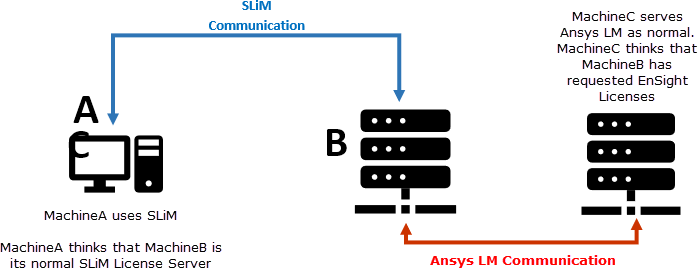
As a tangible example to illustrate what needs to run where, with what environment variables, and what the expectations are, the following basic example is used for demonstration.
MachineA = macOS machine on which the user anticipates running EnSight.
MachineB = machine on which the SLiM translation daemon will be running (must be Windows or Linux machine)
MachineC = Ansys LM license server machine (must be Windows or Linux machine)
MachineA
No additional software needs to be installed. You can continue to use your existing version of EnSight.
You do not need any additional services/daemons running.
You must set environment variable SLIMD8_SERVERS=MachineB:7790
MachineB
You need to install SLiM from 2025 R1 (part of the normal EnSight installation).
You need to set environmental variable ANSYSLMD_LICENSE_FILE=1055@MachineC
You need to set environmental variable SLIMD8_SERVERS=MachineB:7790
You need to run SLiM8 license daemon on this machine.
MachineC
There are no changes in operation for MachineC. It is your normal Ansys LM license server running normally.
Note:
SLiM8 is still in use. It remains as a license translator on MachineB. MachineA will still think it is using SLiM8 license checkout mechanisms.
MachineB MUST be either Linux or Windows machine.
MachineB and MachineC could be the same identical machine. We only separated them in the diagram/demonstration for clarity.
The process of license checkout requires an additional process in the loop (this SLiM translation daemon). When debugging any issues, remember the additional steps in getting from the client to the AnsysLM and back.
In theory, MachineA could be any operating system. More specifically, MachineA could be running an old (pre-Ansys) version of EnSight. In theory, it should be possible to run older versions of EnSight utilizing current AnsysLM license manager to do so.
There may still be valid reasons for customers requiring SLiM8 keys (legacy versions and inability to update to this method). If Ansys provides SLiM8 keys, they cannot be used in conjunction with 2021 R2 or beyond. As of 2021 R2, SLiM8 license daemon no longer handles SLiM8 keys. The converse is also true, if a customer requires to use SLiM8 keys, they need to ensure that they use SLiM license daemon prior to 2021 R2.
The Academic License bundles (which work via Ansys LM) do not operate on the MacOS versions. The Academic bundles were previously only available for Linux & Windows users, and they continue to be only available on those platforms. Therefore, EnSight on MacOS cannot be used in conjunction with the Academic License bundles.
Beginning at 2021 R2, customers purchasing License Bundles (CFD Premium, CFD Enterprise,
CFD PrepPost) will experience a change in their increments within the license file. No
longer will there be explicit ensight or ensight_enterprise
increments included. Instead, EnSight will now utilize and check-out the
cfd_preppost license, and will automatically start up EnSight Enterprise for
you. The change in increments has been made to better align the intended use of EnSight in
the context of other applications enabled within the cfd_preppost increment. In
order for EnSight to utilize the new cfd_preppost increments, users will need
to be using EnSight 2021 R2 or later. If you have not already updated to 2021 R2, but
receive these reduced increment license files, contact your sales/account representative.
There is a temporary promotion in place to re-issue license keys with explicit
ensight or ensight_enterprise increments until you have migrated
up to 2021 R2 software versions.
EnSight and EnSight Enterprise can still be purchased separately, and their license
increments are still ensight and ensight_enterprise.
Note: This licensing change only affects customers using license bundles (CFD Premium, CFD Enterprise, CFD PrepPost).
Customers with extra or separate EnSight licenses purchased, will still receive a
license file including explicit ensight and ensight_enterprise
increments.
If customers have both stand alone licenses and bundled licenses, EnSight will look to
consume its own stand-alone licenses (ensight or
ensight_enterprise) before looking to consume and cfd_preppost
increments.
Migration Issues
The following situations are known/expected issues which are part of the migration from the old method of increments into the new increments:
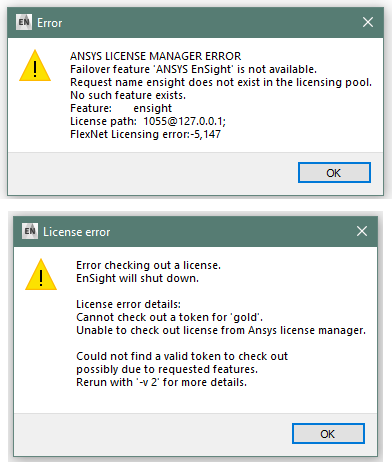
Customers still operate with pre-2021 R2 version; Ansys license admin issues new reduced increment license file. Customer will potentially see these two error messages.
Resolution:
There is a promotion in place to re-issue the license with
ensightand/orensight_enterpriseincrements explicitly included.Upgrade to 2021 R2 or later.
Customers previously ended up consuming these separate
ensightincrements which did not previously consume acfd_preppostlicense. Now EnSight will be consuming ancfd_preppost(and by design acfd_baseas a result). This will reduce their ability to run other software concurrently which requirescfd_preppostorcfd_base.This is a known/anticipated issue. Customers previously were receiving these
ensightincrements for free. This change better aligns the use of the software in the context of the intendedcfd_preppostlicense.Resolution:
Purchasing stand alone seats or additional
cfd_preppostlicenses.
Customer currently has CFD Premium. Previously this only allowed EnSight to run. With this change, the customer will now be running EnSight Enterprise for no additional charge.
This is a known/anticipated side effect of this change in licensing. There should be no downside to usage when moving from EnSight Standard to EnSight Enterprise.
Resolution:
None needed.
In EnSight 2023 R1, the Ansys License Manager (Ansys LM) allows idle licenses to be made available for subsequent use by new sessions of EnSight. An example of a use case would be your EnSight session going idle during meetings or overnight. The idle license is then made available for a new session of EnSight to utilize that license such as a batch EnSight job at night. Once the formerly idle session of EnSight is made active again, it attempts to check out a new license to continue with its interactive operation.
Functional Operation
To utilize this capability, the following features and conditions need to exist for this functionality to work:
Your Ansys LM file needs to include the
lic_timeoutfeature.Note: Contact your account manager to activate this feature.
Your anayslmd.opt file must contain either the option
TIMEOUTALL <seconds>or the optionTIMEOUT <feature> <seconds>to control which applications are considered for this idle timeout, and after how many seconds. See Setting Idle Timeout for details on the Ansys LM option file location, format, and contents information.Note: The value
<seconds>is a minimum of 3600.EnSight will need to be started with command line argument
-slimtimeoutor-licensetimeout.EnSight session will need to idle for a minimum of 61 minutes; 60-minute minimum default for Ansys LM plus 1-minute minimum for EnSight to update its
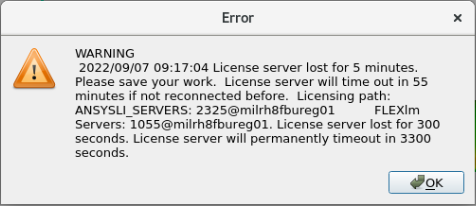
idlestatus with Ansys LM.At that point of idle timeout, the license will be checked back into Ansys LM and made available for a new session to use. When the original idle EnSight session becomes active again, it will attempt to check out a license. If there are no licenses available, it will prompt you with a Error dialog (after 5 minutes) and be given an opportunity to save and quit your session of EnSight before the application forcibly quits (further 55 minutes):
Note: Batch operation of EnSight will never invoke an idle status for itself. Only interactive sessions of EnSight will ever become idle.
Refer to the Ansys LM documentation on the Idle feature Setting Idle Timeout for its operating procedures and constraints.
Versions prior to EnSight 2023 R1 cannot participate in this Ansys LM based idle license check-in option.
Both EnSight and EnSight Enterprise can participate in this Ansys LM based idle license check-in.