


The Modeling Group node has three sub-levels:
Modeling Ply (MP): The ACP lay-up is defined at this level. The other two levels are built automatically from information defined in this level.
Production Ply (PP): Production Plies are generated derived from the Modeling Ply definition (Material and Number of Layers). A Fabric and Stackup is one Production Ply. A Sublaminate typically contains more than one Production Ply. In addition the Number of Layers option is also propagated to this level.
Analysis Ply (AP): The analysis plies describe the plies used in the section definition for the Ansys solver. A Fabric results in one Analysis Ply. A Production Ply without an Analysis Ply indicates that the resulting Analysis Ply contains no elements and is therefore not generated.
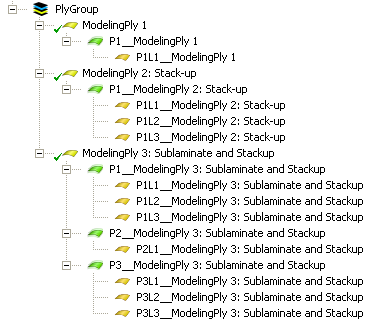
In the example below, there are three different MP separated by one interface layer:
ModelingPly 1: Defined with a single Fabric
ModelingPly 2: Defined with a Stackup of two Fabrics
ModelingPly 3: Defined with a Sublaminate containing three production plies (Stackup, Fabric, Stackup), which results in five analysis plies.
The interface layer lies between the second and third modeling plies.
You can easily navigate through the ply definition with a shortcut. Use the square brackets keys ( [ and ] ) to move up and down through the plies.
Modeling Plies can be reordered or moved between Modeling Groups using cut-and-paste or drag-and-drop. See Reordering Modeling Plies, Interface Layers, and Butt Joint Sequences for details.