


Sensors Overview
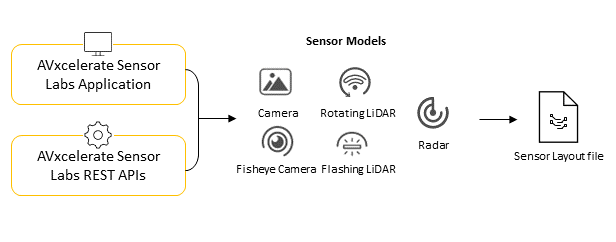
This page outlines the different sensor types that Ansys AVxcelerate Sensors Simulator can simulate and introduces the AVxcelerate Sensor Labs applications.
Sensor Types
- camera or fisheye camera
- LiDAR (flashing or rotating)
- radar (mono-mode, interleaved or simultaneous multiplexing, juxtaposed modes)
- FLIR thermal cameraImportant: In the current version, FLIR thermal cameras are not supported by AVxcelerate Sensor Labs. As a result, you cannot create such sensors with the Sensor Modeler application (for more details, see Editing FLIR Thermal Camera Parameters), nor use the Sensor Layout application to add a FLIR Thermal Camera to a Sensor Layout (refer to Adding a FLIR Thermal Camera to a Sensor Layout).
AVxcelerate Sensor Labs
To create sensor models, then configure the sensor layout that will be used in the simulation, you can use the AVxcelerate Sensor Labs Application or the AVxcelerate Sensor Labs API.
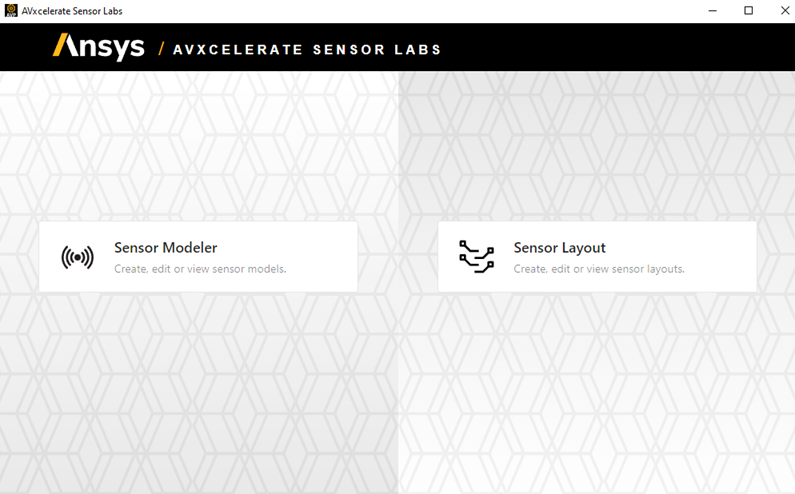
AVxcelerate Sensor Labs Application
- The Sensor Modeler allows you to create, customize, manage and share sensor assets.
- The Sensor Layout allows you to assemble and position sensor assets in a sensor layout to be mounted on your ego vehicle.
AVxcelerate Sensor Labs API
For advanced creation and edition of sensor models and layouts, the interfaces of the AVxcelerate Sensor Labs application are exposed, for more details refer to REST APIs.
Backward Compatibility with 2024 R2 Sensors
Sensor models and sensor configurations (layouts) created with the 2024 R2 version must be migrated to 2025 R1.
To do so, you can either use the Sensor Labs application or the AVxcelerate Sensor Labs API.
- Using the 2025 R1
AVxcelerate Sensor Labs application, you have two possibilities:
- the first time you launch the application, click OK when you are prompted to migrate the content of your libraries so that all the content of your libraries is automatically converted,
- upload 2024 R2 sensors and layouts to the application, the uploaded sensors and layouts are automatically converted.
- Using the 2025 R1 AVxcelerate Sensor Labs API: upload 2024 R2 sensors and layouts, the uploaded sensors and layouts are automatically converted.
In every case, the 2025 R1 version of your sensors and layouts are then available in your libraries and the 2024 R2 version remains available.
If the migration using the AVxcelerate Sensor Labs application fails with the error message Failed to migrate your existing Sensor Labs Library to the new version., refer to Sensor Labs Migration Issue.