This procedure shows how to add elements to the environment, like
vehicles and their related scripts and behavior, pedestrians, road markers in AVSimulation SCANeR™.
Make sure that you create the scenario in the configuration that you are going to use for
the co-simulation. We recommend to use the
VRX configuration provided in the AVxcelerate Headlamp Library for SCANeR.
In SCANeR, select the
SCENARIO mode .
Click New.
In the Choose terrain window, select a
Terrain.
Click OK.
The Terrain is displayed in the Scenario 3D view. The Scenario is ready to be designed.
Create your scenario using the resources provided in the
RESOURCES panel.
Note: Do not use sources and vehicles that are not cars
nor pedestrians.
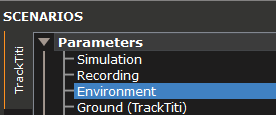
To setup the time of the simulation, go to SCANeR > SCENARIO panel > Parameters, then:
Double-click Environment.
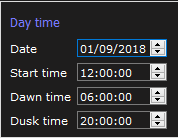
Go to DayTime, then set the Date,
Start time, Dawn time and Dusk
time.
Click OK.
Click File > Save Scenario As.The scenario file must be located
in a folder whose name corresponds to the SCANeR Configuration Name.
Note: Do not use spaces in the scenario file name.
Click Save.
The Scenario is created.Now, you need to create
a SCANeR co-simulation project.


 .
.
 .
.