


Configuring the Graphics Settings for AVxcelerate Asset Preparation
If you install AVxcelerate Asset Preparation on a laptop with an integrated GPU, perform these steps to define the (NVIDIA) GPU and/or the integrated chipset for best performance.
To Define the Graphics Card:
- Open Windows Graphics Settings.
- In Graphic performance preference, click Browse.
- Select the executable VRXPERIENCE.Editor.exe from [AVX Installation Directory]\VRXPERIENCE.
-
Click Options, then set the
Graphics preference to High
performance.
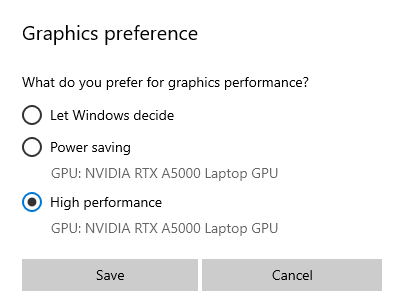
- Click Save.