


System Requirements
This page provides the hardware and software requirements your workstation must comply with.
Hardware Requirements
|
Minimal |
Recommended |
|||||||
|---|---|---|---|---|---|---|---|---|
|
Use case |
CPU |
RAM |
GPU |
Network |
CPU |
RAM |
GPU |
Network |
|
Editor or Simulation Node |
6 Cores 3.2 GHz base frequency |
32 GB |
P6000 |
1 Gbps |
8 Cores 3.7 GHz base frequency |
64 GB |
RTX6000 |
1 Gbps |
|
Deploy Node (Driver view) |
Quad Core 3.2 GHz base frequency |
32 GB |
P6000 |
1 Gbps |
Quad Core 3.7 GHz base frequency |
64 GB |
RTX6000 |
1 Gbps |
NVIDIA GPU Drivers
R550 U9 (553.09) WHQL (Release Date: Thu Sep 19, 2024)
Other Hardware Requirements
Ansys AVxcelerate Lighting and Sensors is compatible with Logitech Racing Wheels G25, G27 and G29.
Software Requirements
Compatible Operating Systems
Windows x64
For operating system requirements, refer to the Platform Support by Application / Product PDF on the Platform Support section of the Ansys Website.
Compatible Driving Simulators
Ansys AVxcelerate Lighting and Sensors 2025 R1 is compatible with:
AVSimulation SCANeR™ version 2021.1 or version 2023.2
- CarMaker versions 11.0, 12.0.1 and 13.0
Other Software Requirements
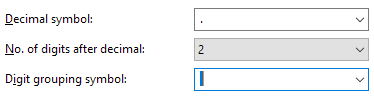
- From Regional Settings > Additional
settings, set a dot "." as decimal separator and a space as digit grouping
symbol.
- You may install the following software to fully use Ansys AVxcelerate Lighting and Sensors.Note: Only versions mentioned here are validated. Ansys provides limited support on newer versions.
- Microsoft Excel from 2013 and Office 365
- Microsoft Visual Studio 2019, MSCV toolset 14.20
- MATLAB and Simulink from 2016b