


Junction Tool Options
Select an option from the  Junction tool in the Create group on the Sheet Metal
tab:
Junction tool in the Create group on the Sheet Metal
tab:
| Bend | A traditional, circular bend between two sheet metal walls. |

|
| Full Overlap | One wall overlaps the other. |

|
| Partial Overlap | One wall overlaps the other halfway. |

|
| No Overlap | The walls meet but do not overlap. |

|
| Sharp | Removes rips and bends from the geometry and returns it to a shell, where there is no inside or outside radii. (You can also rotate a 180° "hem" to create a 90° flange.) |

|
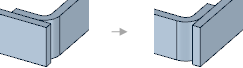
| Flange | One side of the junction is bent and the other is straight. Use Reverse to change the bent and straight sides. |
|
| None | The junction will no longer be recognized by SpaceClaim. |
The junction type you select is saved as the default for the session, so any junctions created by Pull will be this junction type.