


Polarization
The Polarization tab in the Object Properties can be used to help set definitions for specific polarizing elements when the active row is either a Jones Matrix or Mueller Matrix object type. When the object is set to any other type, this tab will be inactive.
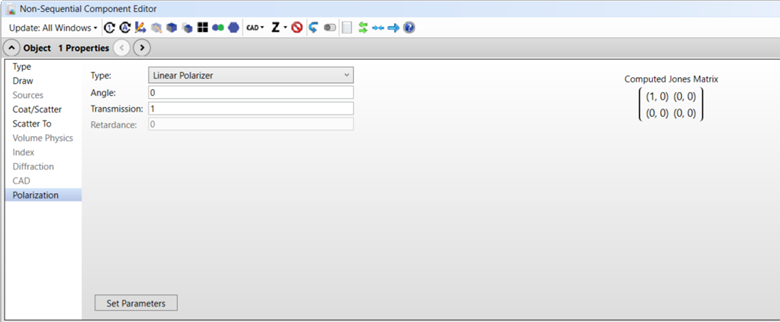
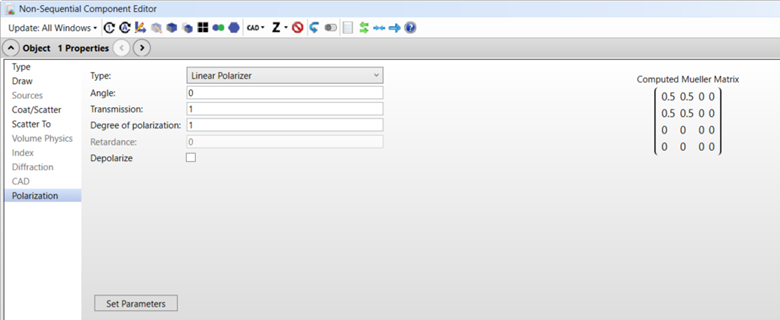
Once you select a "Type" from the drop-down menu, values can be entered in the associated text boxes to compute a Jones or Mueller Matrix definition for the selected polarizing element. Clicking "Set Parameters" will define the active object with the matrix elements shown in the right-hand side of the display.
When the object parameters are modified in the Non-Sequential Component Editor, the displayed matrix will be updated based on the new, active parameters of the object. The displayed matrix will be replaced with the computed matrix based on the left-hand inputs once any values for Angle, Transmission, or Retardance are modified.
Type "Linear Polarizer" and "Linear Retarder" polarizing elements are supported for the Jones Matrix and Mueller Matrix.
Angle Defines either the axis of transmission (when "Type" is set to "Linear Polarizer") or the fast axis (when "Type" is set to "Linear Retarder").
Transmission Defines the transmission of the polarizing element on the intensity of incident rays.
Degree of Polarization Defines a depolarizing ratio that the computed matrix will have on incident polarized light. This factor is multiplied to the matrix terms M11-M33, and values of 0 to 1 (inclusive) are accepted. A value of 1 represents a matrix that outputs fully polarized light, and a value of 0 represents a matrix that outputs randomly polarized light. Only applies to Mueller Matrix surface types.
Retardance Defines the phase delay of the slow axis from the fast axis. Active only when "Type" is set to "Linear Retarder".
Depolarize Sets the "Depolarize" parameter to 1 in the Lens Data Editor if the Surface Type is a Mueller Matrix if checked. Sets the "Depolarize" parameter to 0 if unchecked. Disabled for the Jones Matrix surface.
Set Parameters When clicked, this button will set the active surface parameters to match the displayed preview matrix within the Polarization tab.