


Export to PanDao
This Export Group tool is in Sequential UI Mode only.

Description of the Export to PanDao Tool The Export to PanDao tool collects data about an optic from the OpticStudio file, and then creates a .JSON file for use by the PanDao website . The .JSON contains information needed for optical manufacturing, such as edge diameter, clear aperture diameter, surface shape, lens thickness, and tolerances. The PanDao website can help assess the impact of lens fabrication methods on cost and performance and suggests a manufacturing process.

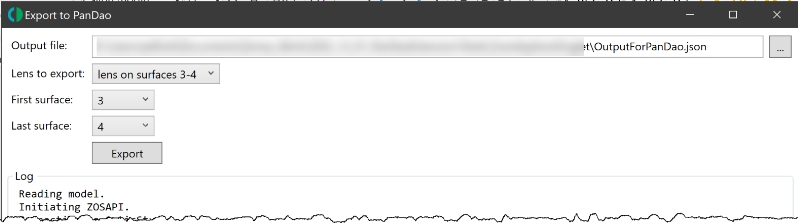
Settings The Export to PanDao tool allows users to set the path and filename under "Output file:", as shown below. The "Lens to export" option lists singlets and mirrors that are automatically detected in the OpticStudio file. Since all optics may not be correctly detected, users can also manually specify the first and last surface of an optic using the "First surface" and "Last surface" settings. A log is displayed in the window, as well, showing the progress of the export.
Supported items Mirrors and singlet lenses with on-axis apertures are supported. Supported surface types are Standard, Even Asphere, Extended Asphere, Odd Asphere, Extended Odd Asphere, and Q-type Asphere. Both refractive and reflective surfaces are supported. Material, Mechanical Semi-Diameter, Clear Semi-Diameter, Thickness, and Radius values are taken from the Lens Data Editor. If the material type is MIRROR, the substrate shape and thickness will be read from the Draw property of the surface if the values are present.
The following operands from the Tolerance Data Editor (TDE) may be used by the Export to PanDao tool: TWAV, TRAD, TCUR, TFRN, TTHI, TSDX|Y|R, TEDX|Y|R, TSTX|Y|R, TETX|Y|R, TIRX|Y, TIRR, TEXI, and TEZI. Element tilt and decenters (such as TEDY or TETR) are only relevant if applied to a single surface (Surf1 = Surf2 in the TDE). If redundant operands are defined for a surface, only the last operand in the TDE is used.
For spherical surfaces, decenter and tilt values are indisitinguishable. If multiple tilt or decenter operands are present in the TDE, the Export to PanDao tool will choose the last operand listed. The tool checks all supported surface types to find out if they are spheres by checking for the presence of aspheric coefficients. For example, an Even Asphere whose coefficients are all zero will be recognized as a sphere by the tool.
For aspherical surfaces, tilts and decenters can be specified separately. If redundant operands are present in the TDE, he Export to PanDao tool will choose the last tilt operand and the last decenter operand listed.
Additionally, asphericity is calculated and included in the .JSON file.
Conversions Data from the OpticStudio file must be translated into the correct format for PanDao's .JSON file. These conversions may require approximations, users should evaluate whether the approximations are valid for their systems.
Conversions of tilt and decenter for spheres For surfaces that are spheres, tilt and decenter are indistinguishable. If a decenter operand is present on a spherical surface, it will be converted to tilt in arcminutes as listed below. Tilt operands such as TIRX and TIRY also require conversion into arcminutes of tilt.
| Operand in the TDE (spherical surface) | PanDao syntax | Conversion calculation |
|---|---|---|
| TSTX|Y|R | decenter α | 60 (max – min) |
| TETX|Y|R | decenter α | 60 (max – min) |
| TIRX|Y | decenter α |
 where α is the tilt in arcminutes, max and min are the values listed for the TIRX or TIRY operands, and D is the clear semi-diameter of the surface |
| TSDX|Y|R | decenter α |
 Where α is the tilt in arcminutes, and max and min are the values listed for the decenter tolerance operand. |
| TEDX|Y|R | decenter α | (Same as above, for TSDX|Y|R.) |
Conversions of tilt and decenter for aspheres
For aspheric surfaces, tilt and decenter can be specified separately.
| Operand in the TDE (spherical surface) | PanDao syntax | Conversion calculation |
|---|---|---|
| TSTX|Y|R | decenter α | 60 (max – min) |
| TETX|Y|R | decenter α | 60 (max – min) |
| TIRX|Y | decenter α |
 Where α is the tilt in arcminutes, max and min are the values listed for the TRIX or TIRY operands, and D is the clear semi-diameter of the surface. |
| TSDX|Y|R | decenterSideShift β | (No conversion needed.) |
| TEDX|Y|R | decenterSideShift β | (No conversion needed.) |
Calculating "power" for TRAD, TCUR, and TFRN
The conversion of the tolerances on radius of curvature into fringes of power is given below. This calculation uses the sag change at the edge of a sphere, which is only strictly valid for spherical surfaces. For aspheres, the calculation should use the Best-fit Sphere (BFS), and the calculation shown below may be too large, the effect will be larger for more extreme asphere shapes.
| Operand in the TDE | PanDao syntax | Conversion calculation |
|---|---|---|
| TRAD, Data = 0 | power φ |
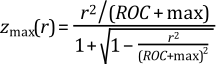 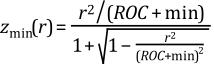  Where φ is the power in fringes, z(r) is the sag of the sphere where r is the radial coordinate, D ins the clear semi-diameter, λtest is the wavelength specified by TWAV, and max and min are from the TRAD operand. |
| TRAD, Data = 1 | power φ | Same as above, but max and min interpreted as percentage of ROC. |
| TCUR | power φ | Same as above, but max and min now apply to the curvature = 1/ROC. |
| TFRN | power φ | φ = 2 (max – min) / λtest |
Calculating "irregularity" for TIRR, TEXI, and TEZI
Conversions from TIRR, TEXI, and TEZI into P-V fringes are given below. For TEZI, which is RMS irregularity in lens units, we assume that the P-V is 3.5 times the RMS. Depending on the form of the irregularity, this may not be a good estimate but it is generally valid for complex combinations of Zernike terms on the surface.
| Operand in the TDE | PanDao syntax | Conversion calculation |
|---|---|---|
| TIRR | irregularity χ | χ = |Largest of max or min| |
| TEXI | irregularity χ | χ = max |
| TEZI | irregularity χ |
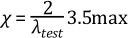 |
Asphericity Asphericity measures the sag departure of a surface from a sphere that contains (or just touches) the aspheric surface. The value for "asphericity" can be retrieved from the P-V of the sag map with the Minimum Volume Best-Fit Sphere (BFS) removed. In the Merit Function Editor, the value can be returned by using the DSAG operand.
Next: