


5. Define Flows by Case: activate if Block versus if/then/else Block
Learn how to conditionally activate parts of the model using an activate if block. Learn the differences between if/then/else, a flow selector block and activate if, a definition by case block.
To access the model on which these first steps rely, you can open the WeatherStation.sproj project located in the examples\GettingStarted\MyFirstModelWithSwan\Initial\WeatherStation folder of your Scade One installation. Open the DefByCaseActIf module to observe the model.
Activate if Introduction
Consider the same previous models where the if/then/else blocks are replaced by an activate if block.
Consider the DisplayTempC function introduced in the previous chapter.
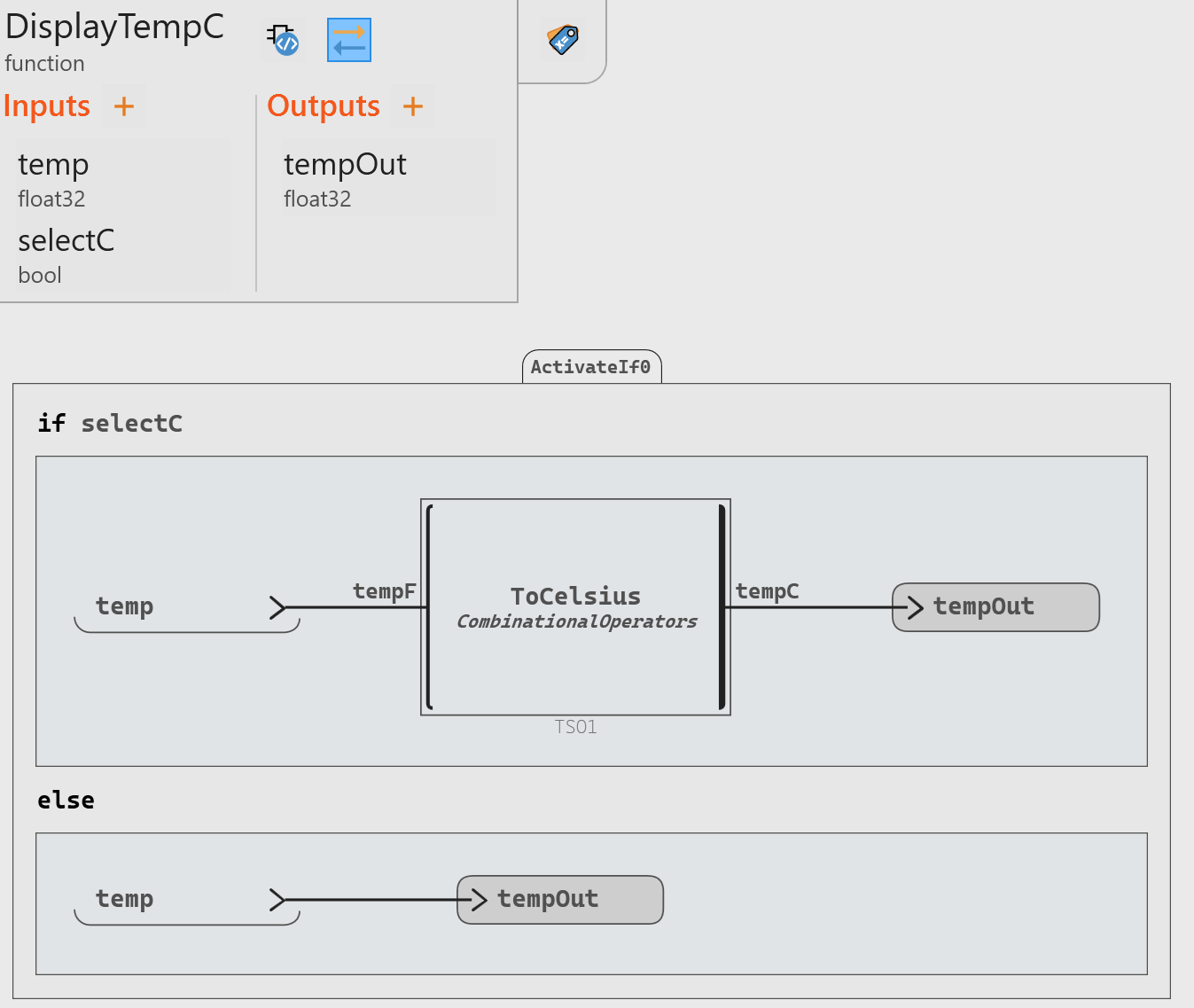
The activate if block returns the output flows of the branch that is only active, that is say, where the Boolean activation condition is true.
When a branch is active, the equations it contains are evaluated, they are not evaluated otherwise.
Above, when selectC = true, the then branch
(first one) is only active, tempOut = ToCelsius(temp) and so
tempC is produced. When selectC = false, the
else branch is only active, tempOut = temp
and tempC is not produced.
For this model to display only either °C or °F temperatures, the activate if block is relevant.
In the same way, when a branch is active, the memories it contains are updated, they are not updated otherwise. Hence, for example the pre operator will return the value produced in the step when the branch it belongs to was previously active.
Consider the DisplayTempAct node modeled with the activate if block:
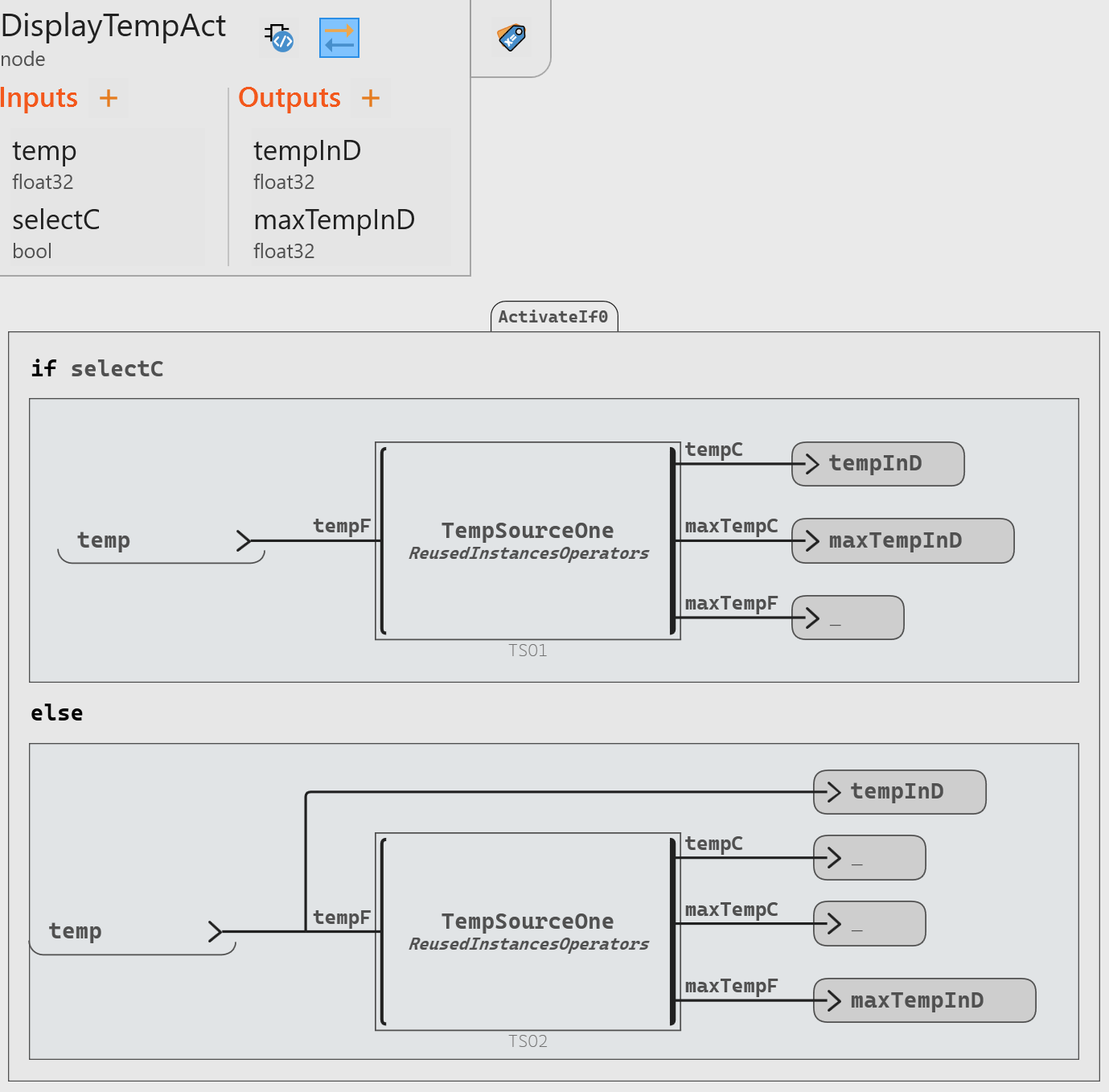
A Swan model must be complete, hence the output flows from an operator instance are connected by wires to a terminator _ when they are not connected to outputs of the root operator as above: for example, tempC is not produced and so connected to _ in the else branch.
| Flows | Time Steps | ||||
|---|---|---|---|---|---|
| 1 | 2 | 3 | 4 | 5 | |
| selectC | true | true | false | false | true |
| temp | 32.0 | 86.0 | 212.0 | 32.0 | -148.0 |
| maxTempC | 0.0 | 30.0 | - | - | 30.0 |
| maxTempF | - | - | 212.0 | 212.0 | - |
| tempInD | 0.0 | 30.0 | 212.0 | 32.0 | -100.0 |
| maxTempInD | 0.0 | 30.0 | 212.0 | 212.0 | 30.0 |
For example, in the step 5, selectC = true and maxTempInD =
30.0 and not 100.0, as in the previous cases with the
if/then/else construct. This 30.0 value is the last
maxTempC value returned in the step 2, the previous time where
the first branch is active.
This is because the first branch (like the second branch) is only evaluated when the
activation condition of the branch is true. So maxTempC is not
evaluated in the first branch in the steps 3 and 4 where selectC =
false.
Then maxTempC is compared with the temperature value of the current step to produce the current maximum temperature.
Note that activate if is not relevant to model the display of the °C or °F maximum temperatures, the computation of the maximum temperature must be independent of the active branch and so of the temperature unit.
elsif Branch Introduction
Now, you want to count the following times:
- timeAboveOut, a time during which the difference between the indoor and outdoor temperatures is greater than a threshold. To count this time, you only want to activate a counter when this difference is above the threshold. This time is computed by the TimeCounter operator introduced in the 2. Add Memory chapter.
- timeBelowOut, a time dunring which this previous difference is below the threshold.
- Otherwise,
timeAboveOut = timeBelowOut = 0.
The activate if block can optionally contain one or several elsif branches. Only one single branch is active in each step: if several branch conditions are true in the same step, only the first branch from the top of this block whose condition is true is only activated.
CONST_THRESHOLD_F = 4.0CONST_TIME_CONV = 1
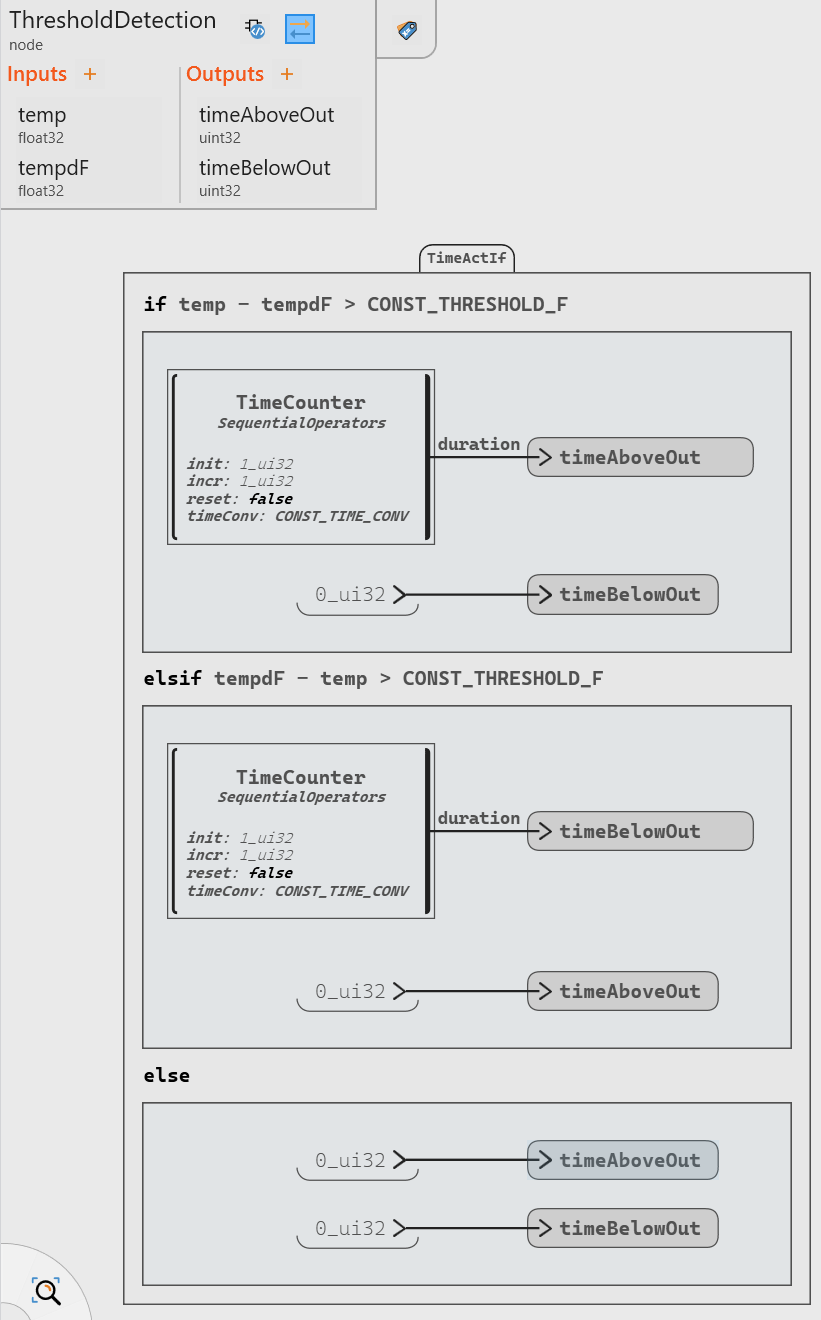
The elsif branch becomes active only when tempdF -
temp > CONST_THRESHOLD_F.