


Scheduler
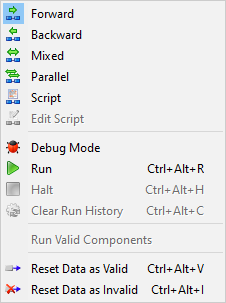


Forward - As soon as an input value is changed, all downstream components are immediately run. This Scheduler is similar to the Scheduler typically found in spreadsheets and is best used for components that run quickly.

Backward - Backward Scheduler is designed to be the most computationally efficient. When inputs are changed, downstream values are marked invalid. No components or links are run until specifically requested.

Mixed - This mode combines features of the Forward and Backward Schedulers. Analysis Components are run in backward mode, i.e., they are not run until their outputs are required. Geometry Components and links are run in forward mode. Both run as soon as one of their inputs changes.

Parallel - The default scheduling mode, this mode functions like the mixed mode Scheduler, with the exception that when encountering a situation where multiple components are ready to be run, all non-driver MCRE components are run, as well as one of any other type of non-driver component.

Script - The Script Scheduler allows you to write your own custom scheduling routines. When the Script Scheduler is selected, the Edit Script Scheduler button becomes active, allowing you to write and edit your script.

Edit Script - This option is available when the Script scheduler mode is selected. This option opens the Scheduler Script Editor.

Debug Mode - When the Scheduler is in debug mode, all links are suspended. This allows components in an integrated workflow to be temporarily run stand-alone. The Scheduler debug mode is useful for experimenting with individual components without having to break the links that feed into the components. After running the component stand-alone, the debug mode can be turned off and all links will resume.

Run - runs the workflow using current Scheduler mode.

Halt - halts a running workflow.

Clear Run History - (available when using Scheduler with Process workflows) this option is available after running a workflow with a scheduler. This option clears the green/red lines from the last run.
Run Valid Components - (available when using Scheduler with Process workflows) this option switches whether a component that is valid is forced to run even if it happens to have valid inputs and outputs when the scheduler gets to it.

Reset Data as Valid - sets all data in the workflow to the valid state.

Reset Data as Invalid - sets all data in the workflow to the invalid state.