


Component Tree Right-Click Menu
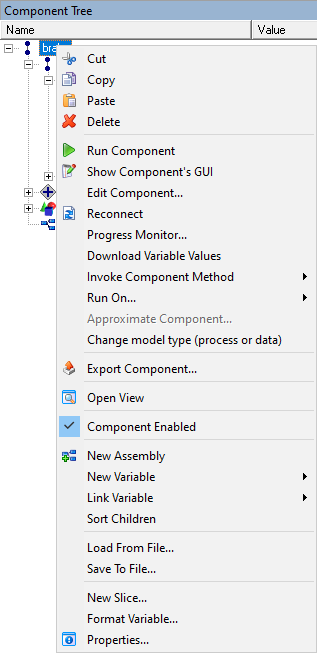
- Cut - Cuts the currently selected workflow or component to the clipboard.
- Copy - Copies the currently selected workflow or component to the clipboard.
- Paste - Pastes the contents of the clipboard into the currently selected workflow or component.
- Delete - Deletes the currently selected workflow or component.
- Run Component - runs the selected component.
- Show Component's GUI - shows the graphical user interface, if there is one, for a component.
- Edit Component - opens the dialog necessary in order to edit the selected component (for example, the Script Component Editor for a Script Component).
- Reconnect - reconnects the component from the ModelCenter Remote Execution (MCRE) server.
- Progress Monitor - opens the Progress Monitor.
Download Variable Values - for components hosted in a ModelCenter Remote Execution (MCRE) server, ModelCenter by default will only download the output variables' values. In some cases you may wish to re-download the values of the input variables, for example after invoking a component method which causes the component to re-read some initialization files. This command causes ModelCenter to download the most recent values of all the variables from the MCRE server.
Note: Component authors can automate this action by using MCRE'sPHXInvokeReturnclass or the FileWrapper's "downloadInputs" command.- Invoke Component Method - invoke a method of the selected component if one exists.
- Run On - opens the Remote Component Connections dialog to select or add a remote node to run the component on.
Approximate Component - opens the Approximation Wizard for generating an RSM approximation for the selected component.
Note: The Approximation Wizard feature is currently disabled.- Change model type (process or data) - converts the selected workflow either from data mode to process mode or (in some cases) from process mode to data mode.
- Export Component - opens a Windows Save dialog to save the selected component as a seperate file.
- Open View - (Assembly components only) opens a new Analysis View for the selected Assembly.
- Component Enabled - enables/disable the selected component.
- New Assembly - inserts a new Assembly component into the currently selected Assembly component or workflow. The Properties dialog for the new Assembly component is displayed.
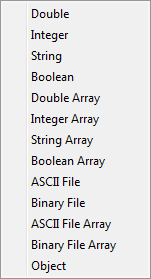
- New Variable - adds a new variable to the currently selected Assembly component
or workflow. Select a Variable type from the following list:
- Link Variable - opens the Link Variable submenu:

- Link Variable to the Top - links the currently selected variable to the top-level component, that is, the workflow.
- Show Variable in Link Editor - opens the Link Editor with the currently selected variable highlighted and shows any links to/from the variable.
- Sort Children - sorts items alphabetically in the Component Tree.
- Load From File - loads the contents of a file into a file variable.
- Save To File - saves the contents of a file variable into a file.
- New Slice - creates a new slice in an array variable.
- Format Variable - edits the display formatting for the selected variables.
- Properties - Displays the Properties dialog for the currently selected item. (Keyboard shortcut: Alt+Enter)