


Secure Connections
Any time there is network communication involved in a process, there is potential cause for concern about the security of the data as it's in transit. In a process of using ModelCenter in tandem with ModelCenter Remote Execution, the communication between the two products is the prime place where security is at issue. The ModelCenter/MCRE framework provides two potential solutions to the security concern, both equal in strength of security, but differing in periphery benefits:
Secure Connections with SSL
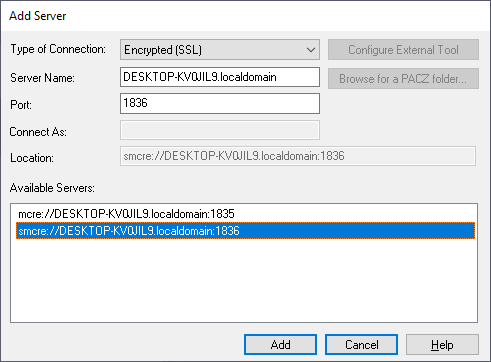
SSL connections to ModelCenter Remote Execution work just like regular connections, except that behind the scenes instead of communicating through regular sockets to ModelCenter Remote Execution you use protected SSL sockets for your communication. By default, ModelCenter Remote Execution is not configured to allow SSL connections, so the first step is enabling this within ModelCenter Remote Execution.
Secure Connections with SSH
SSH connections differ from normal connections in that instead of forging a connection to a running server, SSH connections attach to a specified computer and launch ModelCenter Remote Execution on that server as the specified user. This yields the following benefits:
- ModelCenter Remote Execution runs with the specified user's permissions on that remote system
- ModelCenter Remote Execution is run on the fly, so there is no need for a persistent ModelCenter Remote Execution process
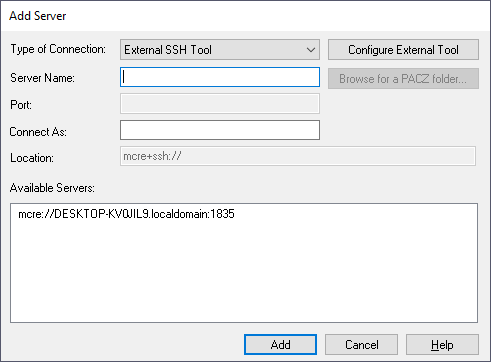
Running such connections require a couple things to be setup on the server side. The first being that the server must be running an SSH server to be able to accept the incoming SSH communications requests. This is fairly standard for Unix servers to already have running, but is something that may require some configuration on Windows platforms.
Many third-party applications used on compute nodes will be run as COM Servers. ModelCenter
Remote Execution and Microsoft Excel are two common examples. When started over SSH, COM
Servers (COM objects started out-of-process as .exe files) tend to inherit the
System environment rather than the user's environment while still maintaining the user's
permissions. A COM Server started this way may not be able to properly load and save
preferences (from the %APPDATA% folder) and also may crash if it tries to
write certain files, especially if it does not have administrative permissions. This
behavior can be overridden by updating each application's AppID.