


Component Tree
The Component Tree displays all the Components and Variables in a workflow. This information is displayed hierarchically. The top-level item is the workflow name. Branches under the workflow are Components or Assemblies. Each item in the Component Tree has a distinct icon that depicts what it is: component, assembly, input variable, output variable, or linked variable. The state of output variables (valid or invalid) is also displayed.
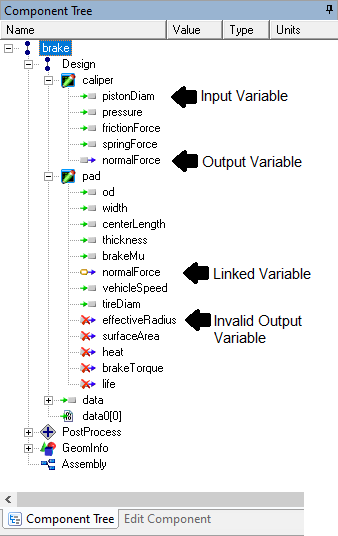
The Component Tree allows you to control many of the aspects of the workflow directly. You may change input values and validate variables. The Component Tree also displays important information about the workflow such as variable values, type, and units.
|
|
|
|
|
|
|
|
|
 Input Variable
  Linked Variable
  Invalid Output Variable
 Valid Output Variable
  File Variable
  Assembly Component