


Variables Pane
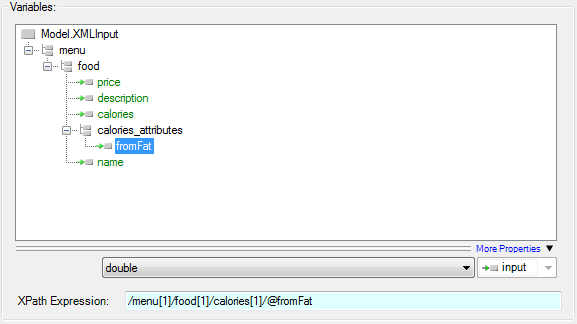
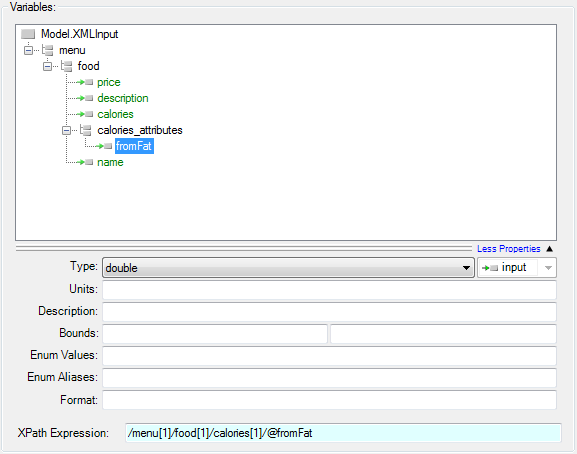
This pane contains information regarding the variables from the XML document that have been selected to be exposed to ModelCenter. This pane includes a tree view of the selected variables. Selecting a variable in the tree view populates the variable property and XPath Expression fields with the values for that variable. Initially, the only variable property that is shown is Type; additional variable properties can be shown by clicking the More Properties expansion button.
| Field | Description |
|---|---|
| Type | The value type of the variable (double, double[], int, bool, string, file, etc). |
| Units | The units of the variable (kilogram, inch, joules, $, etc). |
| Description | A textual description of the variable. |
| Bounds | The lower (left-hand field) and upper (right-hand field) bounds for the variable's value. If either is set and the variable value goes outside of those bounds, the component will error. |
| Enum Values | The optional set of possible values for the variable. If this set is not empty, setting the variable to a value other than one included in the set will cause the component to error. |
| Enum Aliases | The optional set of aliases for the enumerated values. These are used for display purposes in ModelCenter, where the actual value is masked by the alias value. |
| Format | The format of the variable (General, 0.00E+00, $#,##0.00, etc). |
| XPath Expression | The XPath expression used for selecting the appropriate XML node. This can be set to any valid XPath expression. See the XML and XPath help documentation for more information. |