


Installation Notes for ModelCenter Plug-In for Creo
The first time you use the Creo plug-in, you should configure your PTC CAD tool. You will see the dialog below:

Select the Version of Creo
- In the Installed Versions field, select the version of Creo. The plug-in will take a few seconds to detect the correct settings to configure the plug-in.
- Once this process has finished, review the results and click the OK button to continue.
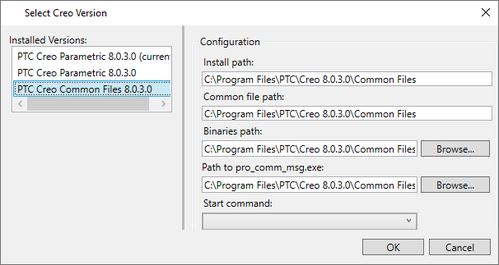
If you later install a new version of the software or would like to switch versions, you can click the Select Creo Version button in the plugin GUI, which will launch this dialog again.
