


How to use the ModelCenter Plug-In for NX
This example uses the beam.prt file, which is available in the ModelCenter Plug-Ins Example Files folder in the CATIA_PlugIns folder.
- In ModelCenter, create a new Model using the File > New menu item or by clicking the New Model button on the Standard or File toolbar. Either action will open a Windows dialog to save the new workflow.
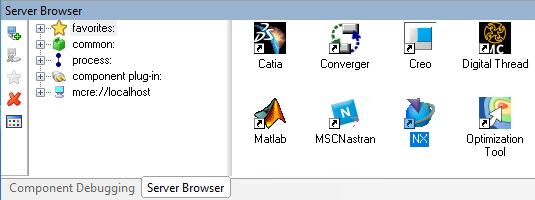
Drag the NX component from the Server Browser and drop it into the Analysis View.
The Initialize PACZ dialog opens. Select the option that best describes the files for your workflow, then select the folder or file as needed.
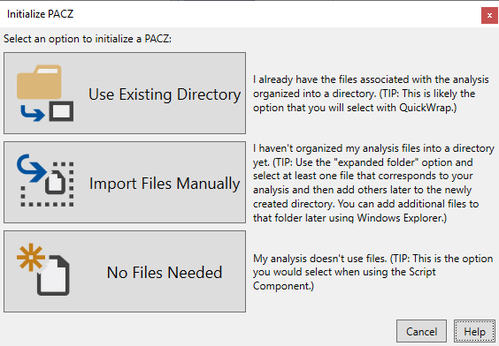
For more information on the Initialize PACZ dialog options, click the Help button in the dialog.
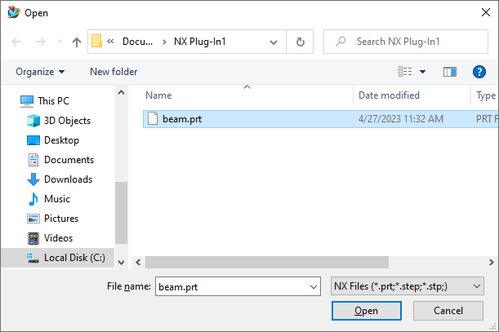
A CAD file selection dialog displays. Select the beam.prt file and click the Open button.
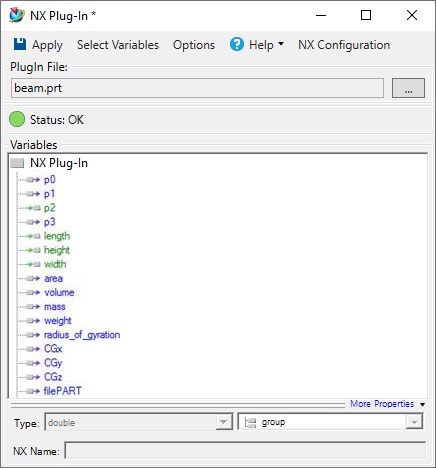
Once the file is loaded by NX, the plug-in will search all design parameters in the current file and extract them into the variable import dialog.

- Specify the desired design variables and click the OK button. The selected variables will be automatically shown in the plug-in.
Click the Apply Changes toolbar button to update ModelCenter, and then close the Plug-In by closing the window.
Using the Component Tree, verify that the component is working correctly by entering the input values, running the component, and then validating the output values.
Input Values:
- p2: 0
- length: 200
- height: 25
- width: 50
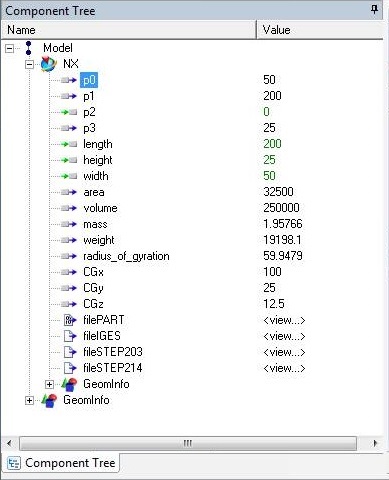
Output Values:
- p0: 50
- p1: 200
- p3: 25
- area: 32500
- volume: 250000
- mass: 1.05766
- weight: 19198.1
- radius_of_gyration: 59.9479
- CGx: 100
- CGy: 25
- CGz: 12.5