


Units Selection Dialog
The Units Selection dialog provides an easy means of applying units consistently across the variables in a model. The units are organized first by the type of unit (e.g., a measure of Acceleration, Force, Distance), then by the actual measure (e.g., feet per second, newtons, miles), and finally the specific nomenclature/alias desired for that unit (e.g., ft/sec, N, mi).
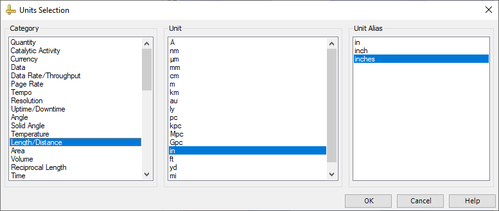
The Units Selection Dialog only applies for variables that have numeric values: double, integer, and long or arrays of those types.
CAUTION:
Changing variable units can cause warnings in the workflow if there are
mismatched links between variables with differing units. It is important to be
consistent when setting units for variables. This ensures that any link that has been
created between two variables will provide clear data when running the model, and not
produce ambiguous or inaccurate results.