Input Variables Changed
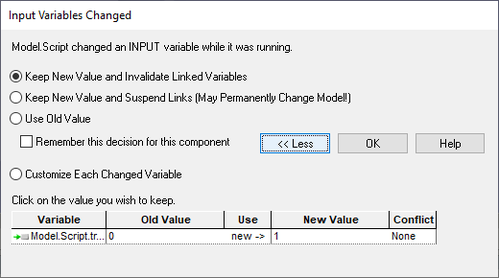
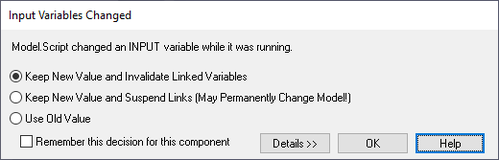
The Input Variables Changed dialog is presented to the user when a Component sets one or more of its own inputs in the process of running. In a generic sense, this type of behavior in a Component is frowned upon, as the Component is superceding the values you set in ModelCenter for it to run with. There are, however, cases where this type of behavior might be warranted, and ModelCenter lets you choose how you wish to handle this situation:
-
Keep New Value and Invalidate Linked Variables - The new value that the Component derived is kept, but any links to that Variable are invalidated. This means that if the input Variable in question was the destination of a link, then even though the Component would have just been run, it will immediately be marked as invalid again.
-
Keep New Value and Suspend Links (May Permanently Change Model) - The new value that the Component derived is kept, but any links to that Variable are suspended. The links may later be restored in the Link Editor by selecting the link, then pressing the Suspend-Resume Selected Link button.
-
Use Old Value - The old value that was specified within ModelCenter is kept.
If the currently selected resolution will be the resolution used for that Component from now on, then you can check the Remember this decision for this component box, which will save your preference and not prompt you again for the Component in question.
By pressing the Details >> button, you can get extended information on exactly what Variables are being decided upon, as well as their old and tentative new values. To retract this extended information, press the << less button.