


Search troubleshooting
Tips to help you troubleshoot problems with searches.
Quick search fails because there are too many results
Queries that include wildcard characters can sometimes fail because there are too many results.
This can happen when using a wildcard (* or ?) on the end of a short search term, for example, ASTM A* or UNS C*. In this case, try refining your search to make it more specific, for example, by adding another keyword, or adding to an existing keyword, and try again.
For example, instead of searching for ' UNS C* ', if you are searching for a copper-nickel, try UNS C7* .
Search term containing a dash has unexpected results
Search terms that include a dash (hyphen) may not always return the expected results.
This is due to the way search terms are split into tokens ("tokenized") so that they can be matched against the terms in the search index. For example, searches for a record named CL-276-0001 will produce the following results:
| Search term | Record CL-276-0001 returned in search results? |
|---|---|
| CL- | yes |
| CL* | yes |
| CL-2 | no |
| CL-2* | yes |
| CL-276 | yes |
| CL-276-0 | no |
| CL-276-0* | yes |
| CL-27? | no |
| CL 27? | yes |
| CL\-27? | yes |
| C?-276 | no |
| C? 276 | yes |
| C?\-276 | yes |
If your search query contains a dash, and you're not getting the right results, try your query with white spaces instead of the dash, or try escaping it with a backslash ( \ ) as shown in the examples above.
Search term does not appear in some of the search results
Sometimes, search results may include folders or records that do not appear to include the search term anywhere. This may be because the search term was found in the folder or record path.
Each record and folder in the database has a path ('breadcrumb') that identifies its location in the database 'tree'. The path includes the names of all its parent folders, going all the way back up the tree. Text searches include the paths of records and folders as well as their names and data, and a path may include a text string that does not actually appear anywhere in the record or folder.
For example, in the search results shown below, you can see records and folders that do not contain the search term explicitly anywhere in their data or properties, because the search term occurs in their path.
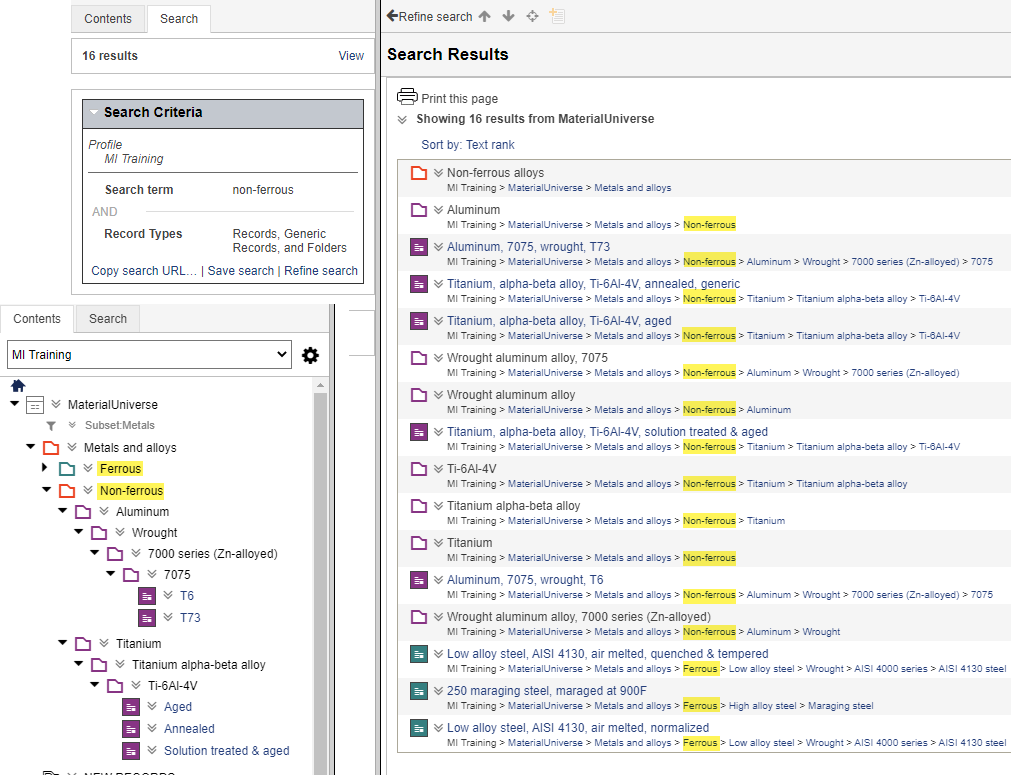
- ferrous in the record path
- non in the record data (Non-flammable)
In this example, to find only records containing the full search term (in data or path), you would enclose it in double-quotes: "non-ferrous".