


Adding Attributes
The Attributes that are available in the schema determine the types of data that can be stored in a table. You can add your own Attributes to the Design and Simulation materials table, and modify or remove them.
- Removing Attributes will result in any data stored in that Attribute to be removed from the records that contain it.
- Attributes that are provided by Ansys are protected, they can be viewed in MI Schema Editor, but they cannot be edited.
| Attribute Information | Description |
|---|---|
| Name | The name of the Attribute. |
| Data Type | The type of data that the Attribute stores. |
| Unit or Discrete Type | The Units for this Attribute or the Discrete Type. |
| Search Filters | Whether the Attribute can be used to refine searches. |
| Target Available | For Attributes that reference other datasources, this indicates whether the Linked tables are currently connected. |
| Is Multivalued | Whether multiple values are valid for Point Attributes. |
| Help Path | The path to an html file that provides additional information about the Attribute. |
| Used in layout | A list of the layouts that contain this Attribute. |
-
Select the Data type and add the Attribute
Name.
Properties that are specific to the type of data will be displayed For more information, see:
Data Type Description Properties Date Date Attributes (DAT) are used to store calendar dates, for example, Saturday, January 1, 2000.
The display of Date values depend on regional date and time settings, for example:
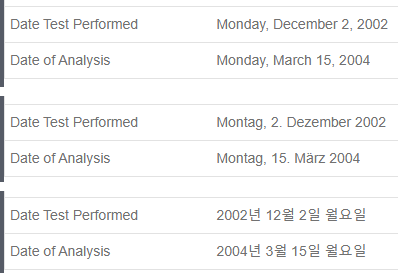
Date Attributes File Data such as supplier datasheets, reference documents, and substance lists, can be stored in File Attributes. A range of different file types are supported, for example, Microsoft Office documents, text files, PDF files. Files up to 500 MB in size can be stored.
File Attributes Hyperlink Hyperlink Attributes are used to store links to external resources (website links and email addresses).
Hyperlink Attributes Picture Picture Attributes can be used to store images in records, for example, schematics or BH curves. Image files up to 10 MB in size are supported. Picture Attributes Logical Store Boolean data (
Yes/No,True/False).Logical (Boolean) Attributes Numerical Store numeric data in three different data types: - Integer Attributes store numbers that are whole, or without a decimal point.
Point Attributes store exact numeric data with decimal points.
Point values may be entered as an integer or decimal, or formatted with an exponent, and values are stored to a maximum of 15 significant figures.
Values must be within the range:- 1.5e-45 to 3.4e38
- 1e-039 to 1e+038 for positive values
Range Attributes store a pair of numeric values representing the upper and lower bounds of a value range.
Values may be entered as an integer or decimal, or formatted with an exponent.
Values are stored to a maximum of 15 significant figures, and must be within the range:- ±1.5×10-45 to ±3.4×1038
- 1e-039 to 1e+038 for positive values
open, meaning that only the maximum, or only the minimum value is defined. The upper and lower boundaries may be inclusive or exclusive.
Text Text can be stored in one of three different data types: Short Text Attributes are used for short (up to 255 characters) alphanumeric values.
A uniqueness constraint on Short Text Attribute values can be enforced, to ensure that no duplicate values can be entered within the same Table. This allows the Attribute to be used as a record identifier, for example, CAS Number, UNS number, EID, Supplier Number.
Long Text Attributes are used for longer blocks of text, up to a maximum of 1,048,576 characters.
The text in Long Text Attributes can be formatted with Markdown if required, for example, to provide headings, and font and list formatting.
Discrete Attributes are used to provide a choice of one or more discrete text values. Values may be ordered or unordered, and there is no limit on the number of values in the set.
The set of permitted values is defined by the Discrete Type of the Attribute. Discrete Attributes which can have more than one value at the same time are known as "multi-value Discretes".
Text Attributes
Custom Attributes that you add to the schema will automatically appear under a "Custom Properties" heading in the search panel and at the bottom of datasheets in MI Explore, and can be added as columns on the List page. Note that the data in Attributes that you create can only be edited in Explore datasheets, they will not appear in Excel workbooks for adding or editing data.