


Synchronization of assignments
Synchronization of assignments between Windchill and Creo can be configured to work in either or both directions.
KeepAssignmentsInSync host configuration option enables
synchronization of assignments between Creo and Windchill. - When
KeepAssignmentsInSync = truefor the Windchill Gateway, assignments will be synchronized in the Creo-to-Windchill direction. (Windchill assignments will be updated in response to any changes in Creo assignments.) - When
KeepAssignmentsInSync = truefor the Creo Gateway, assignments will be synchronized in the Windchill-to-Creo direction. (Creo assignments will be updated in response to any changes in Windchill assignments.)Important: When Creo is configured to assign materials to bodies, this option is not supported, and must not be enabled.
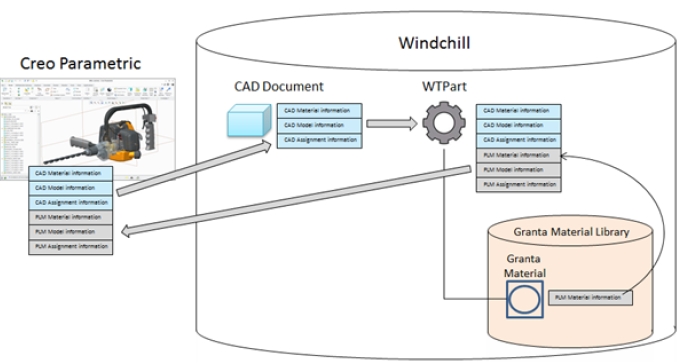
- If Creo-to-Windchill synchronization is enabled
-
Assignments made to a part or body in Creo are transferred to the CAD part document in Windchill when the part is checked in to Windchill.
The default behavior is that the assignment is updated on the Windchill part object (a Granta material object is created and linked to the WTPart object) when the part is opened in MI Materials Gateway for Windchill.
You can enable an additional Creo-to-Windchill automatic synchronization feature that updates the assignment when the part is checked in to Windchill. You do this by installing additional customization files on your Windchill server.
- If Windchill-to-Creo synchronization is enabled
-
When an assignment is made to a part in Windchill, the default behavior is that the Windchill assignment is synchronized to the Creo part model when the part is viewed in a Creo Gateway window.
You can configure MI Materials Gateway to update the assignment on the Creo part as soon as it is opened in Creo. You do this by selecting the installation option Update assignments without opening Gateway, either when installing MI Materials Gateway for Creo, or by editing the client configuration file gconfiguration.ini after installation.