MI Data Flow settings
Where role-based access control for Granta MI is managed in MI User Manager, additional
Roles for use in MI Data Flow can be defined in OneMI.DataFlowUsersGroupNames
on the Advanced page in MI Settings.
Roles in MI User Manager include:
- Pre-defined MI system security and access control roles
- Application-specific roles that can be used to grant groups of MI users specific privileges in those applications.
Application-specific roles for MI Data Flow can be added to User Manager via the
OneMI.DataFlowUsersGroupNames setting, allowing workflow designers to
restrict permission to execute workflow steps to only those MI users who are assigned to the
relevant Roles.
Click Advanced on the MI Settings home page to view or modify this setting.
- OneMI.DataFlowUsersGroupNames
-
Enter a comma-separated list of group or role names, for example
DF_ALLOYS, Test_Reviewers.New Roles with the specified names will be created in MI User Manager.
Example:
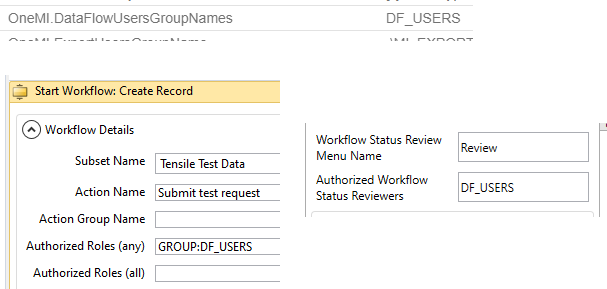
In this example, a DF_USERS role is specified in the
OneMI.DataFlowUsersGroupNames setting.
When this role is specified in the Authorized Roles and Authorized Workflow Status Reviewers fields in the workflow definition for a test request workflow, only users who are assigned to the DF_USERS Role in User Manager will be able to start an instance of this workflow, or review its status in MI Data Flow Manager..