


Results list
After creating selection stages, you can review which materials have passed all, or some, of the selection stages. The results list can be ranked to allow easier navigation and selection of records.
The selection results are the list of materials that pass or fail each selection stage.
Selection results are generated by applying limits during the selection stage, either by adding index lines and selection boxes to chart stages, or by creating limit stages and tree stages .
If no selection has been made then all eligible records are considered to have passed the selection stage. The records available for selection are dependent on which material database has been selected.
The Results of the selection can be viewed in the Selection Project
window by choosing  Chart/Select from the main toolbar.
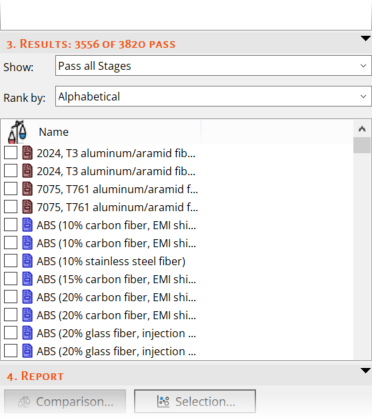
The selection results can be displayed in several formats, showing either:
- records that have passed all stages
- records that have passed a specific stage
- all records displayed in a Pass/Fail table with details of whether they passed or failed each stage in the project
In each format, the selection results can be ranked (where applicable) by one of:
- the attribute (including user-defined attributes) shown on the x- or y-axis of a chart stage
- the performance index of a chart stage
- any of the attributes set in a limit stage
- nearness to a reference record
- alphabetical record name
The selection results can be sorted by the information displayed in a column by clicking the column heading.
Nearness to the reference record is shown as a number between 0 and 100 where 100 is nearest to the reference record. The reference record itself has a ranking of 100.
Your view of the selection results is saved in the project file. If you open a saved project, it overrides the current format and replaces it with the setting in the project.