Enabling FILESTREAM storage on the Miconfig database

This topic describes how to configure the Miconfig database on your cluster SQL instance to use FILESTREAM storage.

Prerequisites: The Miconfig database must already be installed in SQL server and the required login access configured as described in Creating Granta MI SQL logins.

FILESTREAM data must be stored in FILESTREAM filegroups.

  1. Open SQL Server Management Studio and connect to your cluster SQL instance.
  2. Right-click the Miconfig database and choose Properties.
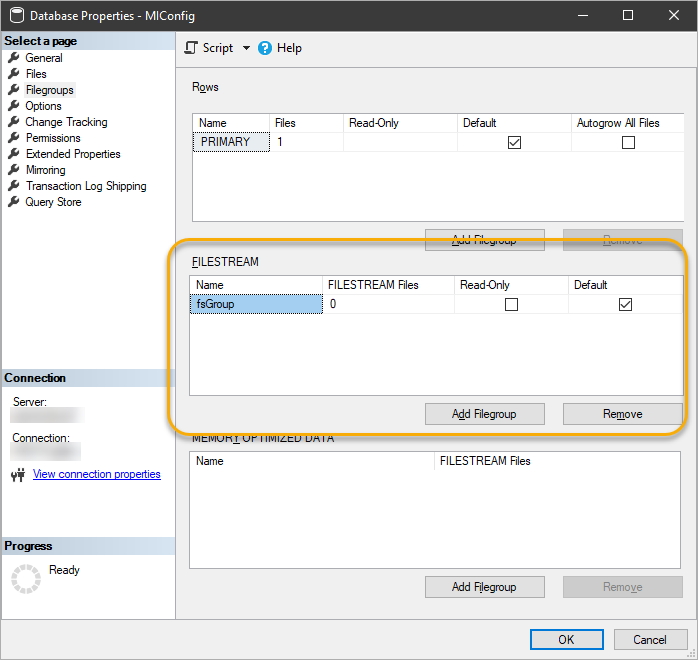
  3. Click Filegroups in the pages list.
  4. In the FILESTREAM panel, add a new filegroup:
    1. Click Add Filegroup.
    2. Enter a name and select the Default check box.
  5. Now add a new FILESTREAM Data file:
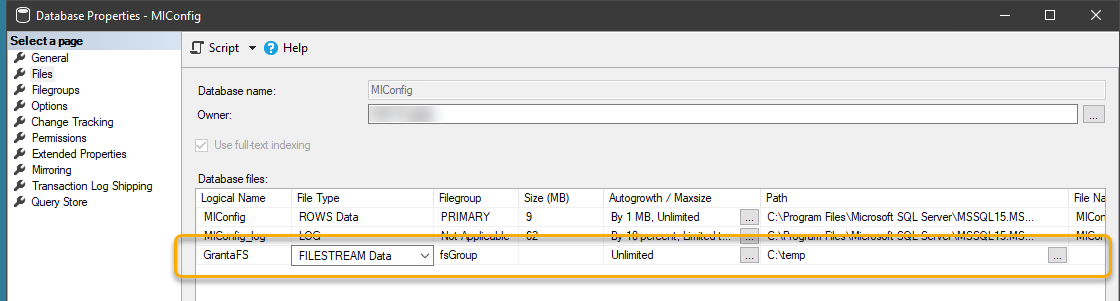
    1. In the pages list, click Files.
    2. Click Add.
    3. Enter a name for the new file in the Logical Name column, for example GrantaFS.
    4. in the File Type column, choose FILESTREAM Data.
    5. In the Path column, enter the location of the file on disk.
      This must be a drive which has enough space to store files.
  6. Click OK to save your changes to the Miconfig database.