


Pass criteria for the stage (Pass when)
You can specify that, for a record to pass the stage, the range of values for an attribute must lie wholly within the range of the selection criteria, or part of the range may lie outside the selection criteria.
-
Click OK.
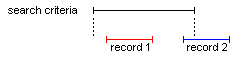
In the above figure, when 'Pass when any part of record is within selection' is set (the default), both records 'pass' the selection. When 'Pass when whole record within selection' is set, only record 1 passes.