Text styling
There are a number of properties you can use for formatting the text in a section.
| Property | Value | Description |
|---|---|---|
| textColor | string |
Specifies the color of any text in the section. You can specify a CSS color name or a hex value. For example:
|
| font | string |
Specifies the font used for text in the section. You can specify any CSS font name. For example:
|
| fontSize | number or string |
Specifies the font size for text in the section. The value may be a number specifying the font size in pixels, or a string specifying a CSS font size property (medium, xx-small, x-small, small, large, x-large, xx-large, smaller, larger). For example:
|
| boldText | true | false |
Specifies the font weight (bold/normal) for text in the section.
|
| italicText | true | false |
Specifies the font style for text in the section.
|
| alignText | left | center | right | Specifies the justification of the text in the section. |
| textLine | underline | overline | line-through | Adds text decoration to text in the section. |
| textLineStyle | dotted | dashed | solid | double | wavy | Specifies the style of the text decoration line. |
| textLineThickness | number or string |
Sets the thickness of the text decoration line. The value can be a number that specifies the required value in pixels, or a string specifying a number value and a different unit. For example:
|
| textLineColor | number or string |
Sets a color of the text decoration line. You can specify a CSS color name or a hex value. For example:
|
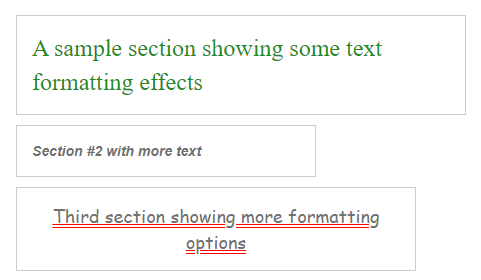
Example:
"sections": [
    {
        "width": 450,
        "paragraphText": "A sample section showing some text formatting effects",
        "padding": 15,
        "textColor": "#228B22",
        "font": "Serif",
        "fontSize": "x-large",
        "outline": true
    },
    {
        "width": 300,
        "paragraphText": "Section #2 with more text",
        "padding": 15,
        "boldText": true,
        "italicText": true,
        "outline": true
    },
    {
        "width": 400,
        "paragraphText": "Third section showing more formatting options",
        "padding": 15,
        "textLine": "underline",
        "textLineStyle": "double",
        "textLineColor": "red",
        "alignText": "center",
        "font": "cursive",
        "fontSize": 18,
        "outline": true
    }
]