


About the Granta MI Pro download package
The Granta MI Pro download package contains the following files and folders.
- Installers for automated installation/upgrade of the Granta MI Pro server software and databases.
- For interactive installations/upgrades, installers for the Granta MI Pro server software, and database backup files for the MI Pro databases.
- Installers for the Granta MI Materials Gateway for MI Pro client software.
- Documentation, including the Granta MI Pro Installation Guide (this document), Granta MI Pro System Requirements, Granta MI Pro Release Notes, and Granta MI Materials Gateway Installation Guide for MI Pro.
The same installation package can be used for new installations or to upgrade existing Granta MI Pro installations.
Before starting installation, check any zip files you have downloaded and make sure they are not blocked. Zip files downloaded from the Internet, including all files inside, may be blocked by the operating system. This can also happen when copying zip files across a network. If the download package zip file is blocked, then running the extracted setup.exe program may cause the Granta MI Installation Manager to fail, or to install blocked DLLs.
Look at the properties of the zip file and see whether an Unblock button appears on the General tab in the file’s Properties dialog:
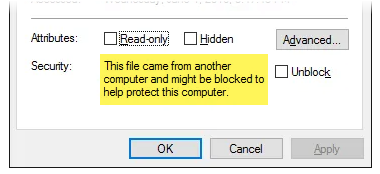
If the zip file is blocked, then you must unblock it before unzipping it again, and proceeding with the installation. In some environments it may not be sufficient to unblock the zip file prior to unpacking. If this is the case, you should try a non-Windows zip utility. Programs from 7-zip or WinRAR are examples of such utilities.