
Using Region Extent Transparency
Complete the following steps to adjust how clearly region boundaries are defined by controlling transparency and edge visibility.
-
Click View.
-
Click Region Extent Transparency to open the Region Extent Transparency window:
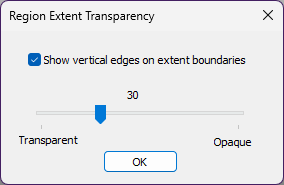
- Check the box to Show vertical edges on extent boundaries.
- Adjust transparency using the slider, which ranges from Transparent to Opaque (max 100).