
R-Matrix
Before running the R-Matrix toolkit, ensure that the mesh count on the source(s) is at least four times the resolution specified in both coordinate directions.
R-Matrix is a type of field ROM for use with a die/chip only. It is used to predict the temperatures on a die/chip with various combinations of tile level input powers. The toolkit produces results instantaneously without running a CFD simulation. It generates an R-matrix for a single or multiple dies. Traditionally, parametric trials are used to turn on individual tile level sources (similar to the LTI and LPV ROM approaches) and turn off the rest of the tile level sources to obtain temperature and resistance data for every tile. The R-Matrix toolkit uses a novel approach to turn on and off the tile level sources in a single analysis, saving computational resources and time. Temperatures of the sources are closely monitored every iteration, and a decision is made to turn off the current tile level source and move to the next source after the convergence criterion is met. All the tiles on a given source in the analysis are virtual and surface flux is applied to the meshed faces of the source. This reduces the modeling complexity of handling large number of tiles because all the tiles are represented by a single sources for one die/chip.
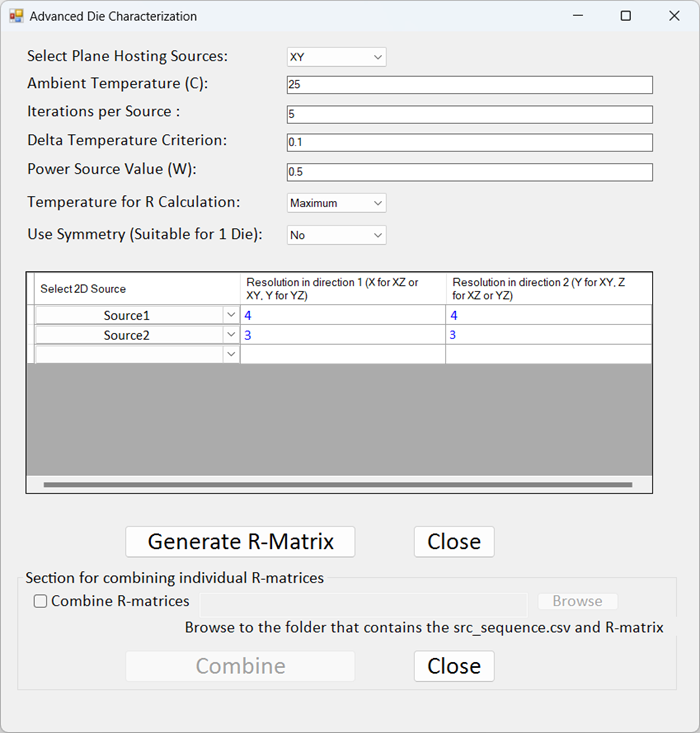
| Select Plane Hosting Sources | For Select Plane Hosting Sources, select the plane on which the source geometry exists. |
| Ambient Temperature (C) | For Ambient Temperature (C), specify the ambient temperature for the analysis. |
| Iterations per Source | For Iterations per Source, specify the number of iterations for the analysis to run for each tile on the selected source. |
| Delta Temperature Criterion | For Delta Temperature Criterion, specify the change in temperature for the analysis to converge and end for each tile on the selected source. |
| Power Source Value (W) | For Power Source Value (W), specify (in Watts) the power for each tile on the selected source. |
| Temperature for R Calculation | For Temperature for R Calculation, select Maximum or Average. This temperature is used in the R value equation, which is as follows: (FaceTemp - AmbientTemp)/Power, where FaceTemp is the maximum or average temperature based on the selected source. |
| Use Symmetry (Suitable for 1 Die) | When analyzing one die, select one option for the solver to reduce the area of the die that is analyzed, assuming symmetrical properties in the remaining area(s) of the die. Half - Horizontal solves half of the die area divided vertically, assuming two symmetrical halves mirrored horizontally. Half - Vertical solves half of the die area divided horizontally, assuming two symmetrical halves mirrored vertically. Quarter solves one quarter of the die area divided horizontally and vertically, assuming symmetry both vertically and horizontally. Select No to solve the entire die area. |
| Select 2D Source | From the drop-down, select the source boundary condition(s) for the die characterization analysis. |
| Note: For a multi-die analysis, specify the powered source on the first line of the source table. | |
| Resolution | For each source, specify the number of tiles (resolution) to be analyzed in both coordinate directions. |
| Generate R-Matrix | Click Generate R-Matrix to run the analysis and create the R-matrix files. |
| Close | Click Close to close the toolkit dialog box. |
Combining R-Matrix Files
After performing the analysis to create the final R-matrix files, you can use the toolkit again to combine them to create one R-matrix file per die/chip. First you must create a comma-separated value (.csv) file (named src_sequence.csv) and place it in the Rmatrix_files directory generated when you first created the R-matrix files. The src_sequence.csv file specifies the names of the sources in the R-matrices and the number of tiles in each source. See the following example:
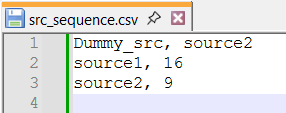
In this source sequence file, a dummy source is specified in the first line. The dummy source is used only to record the temperature; it is not powered. On the next lines, specify the sources to be combined in the desired order followed a comma and the number of tiles on each source.
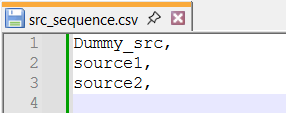
A dummy source is optional. The following is an example of a source sequence file without a dummy source specified. No source is specified after Dummy_src.

| Section for combining individual R-matrices | |
|---|---|
| Combine R-matrices | Select Combine R-matrices to enable the Browse and Combine. |
| Browse | Click Browse and select to the Rmatrix_files folder where the R-matrix and src_sequence.csv files are located. With the Rmatrix_files folder selected, click OK to close the Browse For Folder dialog box. |
| Combine | Click Combine to generate the combined R-matrix files. |
| Close | Click Close to close the toolkit dialog box. |