
Creating a Target Design from 3D Designs
In an HFSS, Q3D, or Maxwell 3D design, Create Target Design automatically generates and inserts a thermal design (Icepak or IcepakFEA Thermal) into your project.
To create a target design from an existing HFSS design:
- Click HFSS > Create Target Design.
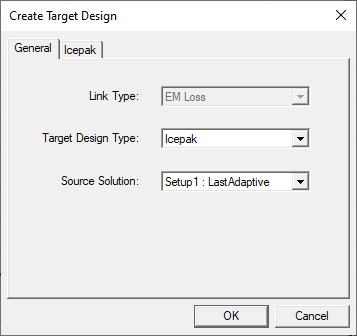
The Create Target Design window appears.
-
Select the Target Design Type to be created.
-
Select the Source Solution to specify the solution data to be linked to the target design.
-
For Icepak designs, specify Forced Convection or Natural Convection on the Icepak tab.
-
For Forced Convection, specify Flow Speed and Flow Direction.
-
For Natural Convection, specify the Gravity Vector Direction.
-
-
Click OK.
Icepak Designs
The Icepak design is generated based on the source design and selections in the Create Target Design dialog box:
Model geometry is created with corresponding material assignments. Vacuum objects are not created in target Icepak designs.
Any assigned materials that do not contain thermal properties are assigned default thermal properties in Icepak.
The Region (computational domain) is created with the appropriate dimensions.
An EM loss excitation is assigned to the geometry, and variable mapping and intrinsic variables are linked to the source design.
Design settings are specified.
Solution type: Steady State
Problem type: Temperature and Flow
For forced convection simulations, the following are defined:
A free opening boundary condition with a velocity specified is assigned to the Region face to create forced flow.
A free opening boundary condition is assigned to the face of the Region opposite to the opening with velocity specified.
In the Icepak Solve Setup dialog box, forced convection Solve Setup Defaults are defined.
For natural convection simulations, the following are defined:
Gravity Vector
Free opening boundary conditions are assigned to each face of the air Region.
In the Icepak Solve Setup dialog box, natural convection Solve Setup Defaults are defined.
IcepakFEA Designs
The IcepakFEA Thermal design is generated based on the source design:
Model geometry is created with corresponding material assignments. For any vacuum objects, Solve Inside is disabled.
Any assigned materials that do not contain thermal properties are assigned default thermal properties in IcepakFEA.
A convection boundary is assigned to the faces of all 3D objects (not 2D sheet objects). A Film Coefficient is specified as Uniform at 10 w_per_m2kel. Objects with Solve Inside disabled and those with air assigned as the material are not assigned to the convection boundary.
An EM loss excitation is assigned to the geometry, and variable mapping and intrinsic variables are linked to the source design.