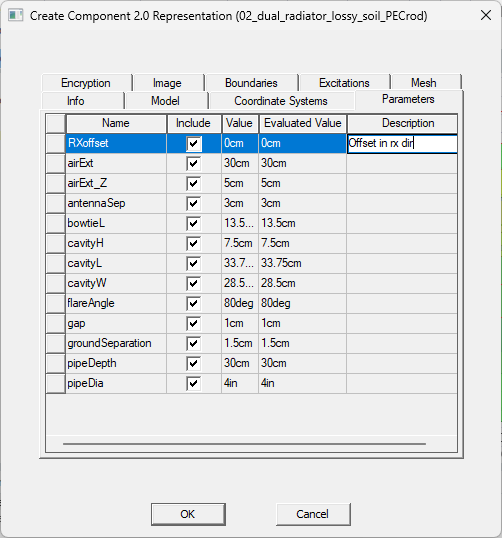
Create Component 2.0 Representation Parameters Tab
Representation properties can be parameterized by assigning variables. The parameters list is populated with all the variables used by objects and coordinate systems, design data, and material properties included in the representation.
- Use the Include check box to include parameters in the representation (selected), or to exclude them from the representation(cleared).
- You can fill in the Description field, if desired.
Non-Geometry Variables in 2.0 Components
If you create non-geometry variables (for materials or boundaries), these are listed separately:
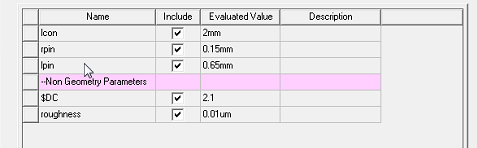
If you exclude any geometry, boundary, or material associated with a variable, the associated variable is automatically excluded on the Parameters tab.
Dependent Variables in 2.0 Components
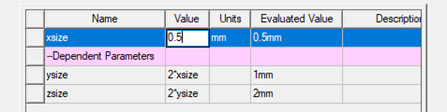
If you create dependent variables, you can choose to display the values.
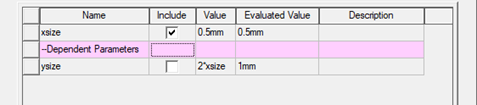
If more variable dependency occurs for an included variable, such variables are also displayed with the option to include.
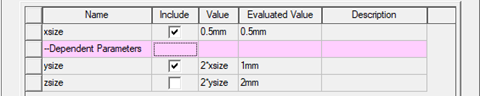
When you insert a representation from a 2.0 component that includes dependent parameters, you can edit the independent variables, but can only view the evaluated values of the dependent parameters.