Opening the Properties Dialog Box
You can open the Properties dialog box in three ways:
- Select the object, and select Edit > Properties.
- To open the Properties dialog box for a component, double-click the component.
- Right-click the object and select Properties.
You can manipulate the Properties dialog box in the following ways:
- Close the Properties dialog box by clicking the OK in the dialog box or by pressing the Esc key.
- Resize the Properties dialog box by dragging its edges.
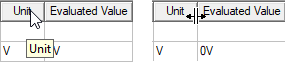
- Change the relative widths of adjacent
columns by dragging the header separators
between them.