
User Options and the Update Registry Tool
When you change an option's value using the Twin Builder UI, the new value is stored in the currently active user options config file. You can also use the UpdateRegistry tool to add, modify, or remove settings in the config file. However, you cannot use the UI to remove settings from the config file. You must use the UpdateRegistry tool to do that.
If you have not already created a user options configuration file (either host-specific or host-independent), before launching the Twin Builder application for the first time, all settings will come from the host-specific default options configuration file or the installation default options configuration file. In a host-specific user options configuration file, any settings applicable to a different host from the current one will not be carried over to the new host. This behavior may be inconvenient if the user has preferred option settings that differ from the default settings, which apply to all users, especially if the user runs the application on a number of different hosts. In this case, the user may choose to use a host-independent registry and set the option values in this type of options file. See Understanding Registry Tools for more information. Host-independent option values can be used on all new hosts, overriding any values set by the administrator to apply to all users. Changes made in the UI can affect the user's host-specific or host-independent registry, depending on the currently specified registry type.
If a current registry does not exist, the program detects earlier major and minor versions of same application on the same machine. If such a registry exists (and does not involve -help, -batchoptionhelp, IsBatchMode(), -regserver, -unregserver, running a script, or non graphical mode), a prompt displays the earlier versions you can select, from which the registry will be migrated.
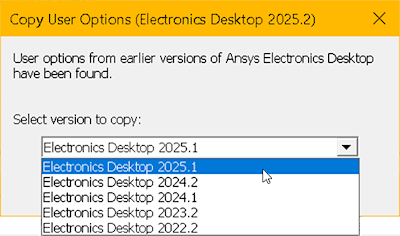
Copy over registry entries (both Windows and Ansys .xml files).
Getting a Value from a Specific Configuration File
Getting a Value Using Precedence Rules
Example of Removing a Host Dependent User Option Setting
Example Adding a Host Independent User Option Setting
Setting the Temporary Directory
Temporary Directory Configuration File Format
Setting the Temporary Directory Using the GUI
Setting or Removing Temporary Directory Values in Configuration Files: UpdateRegistry Command