
Display Format
Use the Display format dialog box for additional control over the display of values throughout Network Data Explorer.
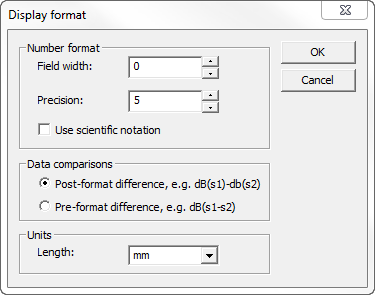
- Field width – The minimum number of characters used to display a number. Values are padded with blanks as necessary. Use to increase the blank space displayed in the data tables to force an increase in column width.
- Precision – The number of decimal places to display.
- Use scientific notation – Select this check box to display values using scientific notation (for example, 3.88124e-001).
- Post-format difference – When comparing data sets, subtract values after applying the formatting function (for example, dB, magnitude); the values displayed will be the difference between the magnitude, dB, and so on.
- Pre-format difference – When comparing data sets, subtract values before applying the formatting function (for example, dB, magnitude); the values displayed will be the magnitude, dB, and so on, of the complex difference.
- Length – The default units used to display and interpret length values (for example, de-embedding length).