
Creating New 2D Designs from 3D Designs
Keep the following points in mind before converting any project:
- A 2D design is created in the same project.
- All 3D geometry is used. You cannot select which geometry to include in the conversion.
- If there are any sheet objects in 3D, only those sheets that lie in the same plane as the section plane are converted.
- 1D objects are not converted from 3D to 2D.
To create a 2D design from an existing 3D design:
- Click Q3D Extractor > Create 2D
Design.
The Create 2D Design window appears.
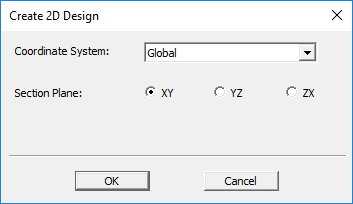
- Select the Coordinate System to be used for creating sections in the 3D model.
- Choose the Section Plane within the chosen coordinate system. You can choose XY, YZ, or ZX.
- Click OK to create the 2D design.
The modeler creates a new design within the current project and generates the 2D model within the new design. All material properties and material assignments are copied to the new design.