
Using a Piecewise Constant (pwc) Function
For Transient
While the pwc function may technically be supported for non-transient parameters (such as temperature-dependent material properties or temperature-dependent convection film coefficients), its usage in these contexts is not recommended. Step changes in a parameter can lead to solution instability and difficulty in convergence.
For example: If a temperature result is very close to where a step change occurs, the solution iterations can oscillate between the values on each side of the step and fail to converge.
This phenomenon is not a problem for transient parameters because the time always progresses in the forward direction. Once a step change occurs, the time-dependent parameter remains stable at the post-step value.
The process of defining a dataset for use in a piecewise constant function is the same as defining a dataset for use in a piecewise linear (pwl) function. This process is covered in the topic Using Datasets to Define Transient Parameters.
Interpretation of Datasets within pwc Functions: A dataset referenced in a piecewise constant function is interpreted differently from when it is referenced in a piecewise linear function. The characteristics of pwc expressions are:
- For each datapoint interval (that is, between each pair of XY values in the referenced dataset), the slope of the curve is zero.
- All changes in the Y value are step changes.
- For each interval (or each consecutive pair of X and Y values), the constant Y value is dictated by the second point of the pair, not the first one. For example: using the datapoint numbers as subscripts, Y2 specifies the constant value for the range X1 through X2, Y3 for X2 through X3, and so on, as tabulated below:
| Interval Number | Datapoint Numbers | Specified Y Values (s) |
Interpreted Constant Time Step for Interval (s) |
|---|---|---|---|
| 1 | 1 | 0 | 0.1 |
| 2 | 0.1 | ||
| 2 | 2 | 0.1 | 0.5 |
| 3 | 0.5 | ||
| 3 | 3 | 0.5 | 0.2 |
| 4 | 0.2 |
The Add Dataset, Edit Dataset, and Design Settings dialog boxes are not aware of whether a dataset will be referenced within a piecewise linear (pwl) or piecewise constant (pwc) function. These dialog boxes will always interpret and display the data points as a piecewise linear curve. In fact, the same dataset could be referenced in either function type for different parameters: pwl(ds1,Time) for one parameter; pwc(ds1,Time) for another.
Consider the following example to understand the distinction between the raw dataset and the interpreted pwc curve.
Example – Comparison of Dataset Definition and PWC Interpretation:
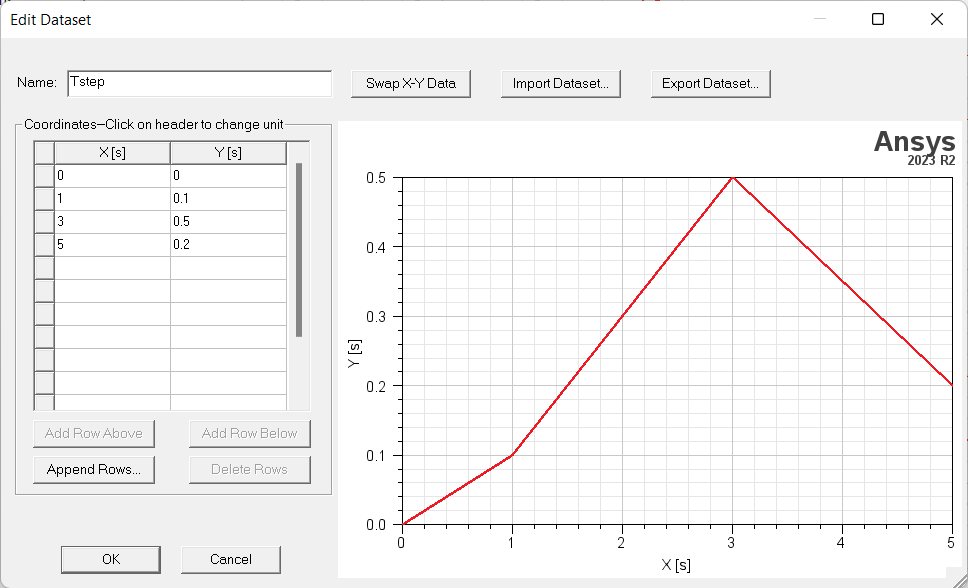
Figure 1: Dataset (Tstep) Definition
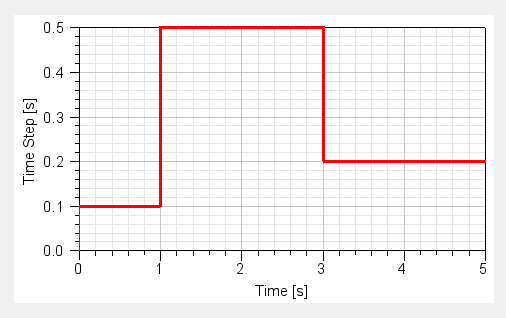
Figure 2: Dataset Interpretation as a PWC Time Step control – pwc(Tstep, Time)