
Heat Generation
This excitation is applicable only to the following entity type:
- Solid Objects
Heat Generation is specified in units of power, such as watts (W) or Btu_per_hr. The Total Power specified for this excitation may be positive or negative. Optionally, for transient solutions, the power can vary with time:
- A positive value adds heat to the model.
- A negative value removes heat from (that is, cools) the model.
If you select multiple objects, the specified Total Power is applied to each of the selected objects, not distributed among them. See the examples in the following procedure.
How to Assign a Heat Generation Excitation:
- Select one or more solid objects, either graphically (in Object selection mode) or from the Solids branch of the History Tree.
- Use one of the following three methods of accessing the Heat Generation dialog box:
- Using the menu bar, click Mechanical > Excitations > Assign > Heat Generation.
- Right-click in the Modeler window or right-click a selected item in the History Tree, and choose Assign Excitation > Heat Generation from the shortcut menu.
- Right-click Excitation in the Project Manager and choose Assign > Heat Generation.
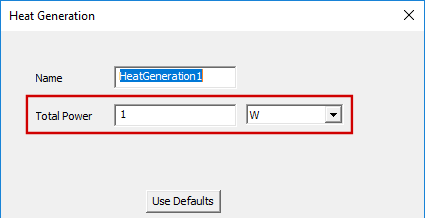
- Specify the total heat generation per selected object in the Total Power text box and select the units from the adjacent drop-down menu. The power value can be positive or negative and can be numeric, a variable, or an expression (with constants, variables, and mathematical operators). Additionally, for transient thermal solutions, the value can vary with time by using a time-dependent dataset reference.
- Optionally, change the Name of the excitation. The default name is HeatGenerationx, where x is a number that increments for each heat generation excitation that you apply.
- Click OK.
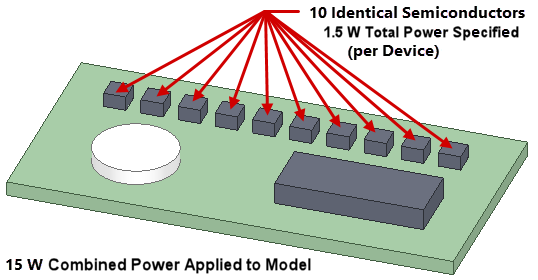
Example 1: Assume that ten components are selected. If you specify 1.5W of Total Power, then each object generates 1.5W of heat and the total power input to the model due to this assignment is 15W (1.5W total power x 10 objects). If the ten objects are identical, then the power density (that is, the power per unit volume) is the same for all of them. This example is a typical usage case for applying a heat generation excitation to multiple parts in a single operation.
Example 2: Assume that two objects are selected, and their volumes are 450 mm3 and 900 mm3. If you specify -9W of Total Power, each object removes 9W of heat. Heat is removed (that is, the model is cooled) because the specified Total Power is negative. The total amount of heat removed due to this assignment is 18W (9W x 2 objects). Since the volumes differ, the power densities differ, with the smaller object having a higher cooling power per unit volume.

A heat generation entry appears under Excitation in the Project Manager:
