
Introduction
Ansys Maxwell is an interactive software package that uses finite element analysis (FEA) to simulate (solve) electromagnetic field problems. Maxwell integrates with other Ansys software packages to perform complex tasks while remaining simple to use. Maxwell incorporates both a set of 2D solvers and 3D solvers in an integrated user interface. This guide will focus on 3D capabilities.
To analyze a problem, you specify the appropriate geometry, material properties, and excitations for a device or system of devices. The Maxwell software then does the following:
- Automatically creates the required finite element mesh.
- Calculates the desired electric or magnetic field solution and special quantities of interest, such as force, torque, inductance, capacitance, or power loss. The specific types of field solutions and quantities that can be computed depend on which Maxwell 3D solution type you specified (electric fields, DC magnetics, AC magnetics, transient fields and data).
- Allows you to analyze, manipulate, and display field solutions.
This guide explores the AC Magnetric (Eddy Current) solver based on a simple example of a disk above a coil. This solver solves Maxwell’s equations in frequency domain, taking advantage of phasors approach.
The frequency domain approximation is based on the linearity assumption; linear materials are advised. The AC Magnetic solver supports nonlinear materials through an energetic equivalent: they can be used in small-signal-like analysis.
The geometry used for this example was created in the Maxwell 3D application and is shown below:
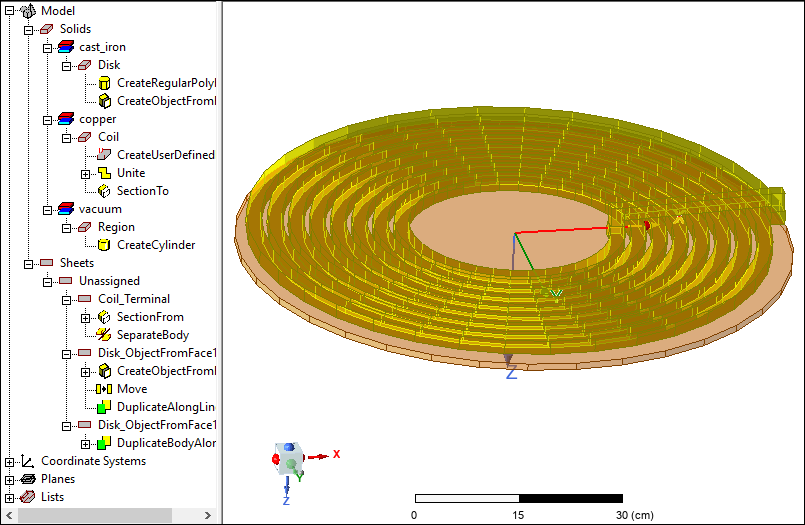
The model is an iron disk above a spiral coil. (In the graphic above, the model is rotated.) A sinusoidal 500 Hz current will be assigned to an eight-turn spiral coil underneath a cast iron disk. The coil induces eddy currents and losses in the plate.