
Creating New 3D Designs from 2D Designs
Keep the following points in mind before you convert any project:
- A 3D design is created in the same project.
- All 2D geometry is used. You cannot select which geometry to include in the conversion.
- 1D objects are converted from 2D into 3D sheet objects.
To create a 3D design from an existing 2D XY design:
- Click
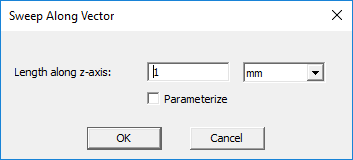
- Enter a value in the Length along z-axis box to obtain a swept length of the model.
- Choose the desired units of the sweep distance entered from the drop-down menu.
- Click OK to create the 3D design.
The Sweep Along Vector window appears.
The modeler creates a new design within the current project and generates the 3D model within the new design. All material properties and material assignments are copied to the new design.
To create a 3D design from an existing 2D RZ design:
- Click Maxwell 2D > Create 3D Design.
-
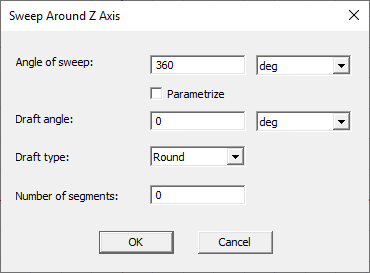
Enter the Angle of sweep and desired unit of measure to obtain a full 360° 3D model or a wedge model of the desired angular size.
-
Enter the desired Draft angle and Draft type. The draft angle is the angle to which you want a 2D object's profile, or shape, expanded (positive angle) or contracted (negative angle) as it is swept. The draft type instructs the modeler whether to maintain the original object shape and how to transition between adjacent faces. (Refer to Draft Type Options for more details.)
Note:Entering a draft angle for a model where objects touch the z axis results in a error due to an invalid object being requested. Draft angles may only be used when no objects are touching the z axis.
-
Enter the Number of segments to use in creating the 3D model. If you do not change the default value (=0), the design will be created with true surfaces.
Optionally check Parametrize for parametric analysis.
- Click OK to create the 3D design.
The Sweep Around Z Axis window appears.
The modeler creates a new design within the current project and generates the 3D model within the new design. All material properties and material assignments are copied to the new design.