
Launching Motor-CAD from Ansys Electronics Desktop
The Ansys Motor-CAD application can be launched from the Ansys Electronics Desktop interface. Access to the Motor-CAD application is available from the Desktop tab's Maxwell icon:
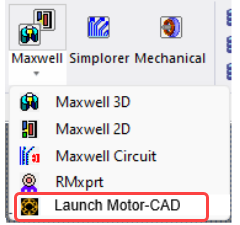
This menu will launch the Motor-CAD application that is registered via the Automation Registration interface. To view and/or edit the Motor-CAD version launched, please refer to the section "Automation and Scripting » Automation Registration" in the Motor-CAD manual.
Coupling between Maxwell and Motor-CAD is set up within the Motor-CAD Lab module; see the Motor-CAD documentation for more details.