
Set Default Boundary/Excitation Base Names
When setting boundaries and excitations on multiple selected surfaces, separate boundary or excitation definitions may be made automatically. Individual entries in the Project Tree will be identified with a Base Name and assigned a sequential numerical value appended to the base name.
The Set Default Boundary/Excitation Base Name dialog box allows the base names for all boundary and excitation type to be specified for the current project.
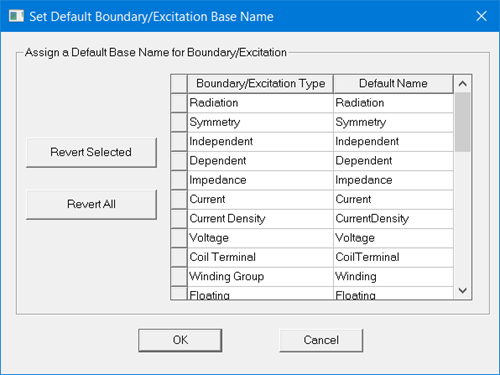
To set the base name for a boundary or excitation type:
- Right click the Excitations or Boundaries entry in the Project Manager window, and select Set Default Base Name.
- Scroll the table to the boundary or excitation of interest.
- Select the value in the Default Name column in the row of interest and enter the new base name. Names must be less than sixty characters and cannot include spaces. Letters, numbers, and special characters are permitted. Illegal names are not accepted and generate a warning message.
- Click OK to accept the changes and dismiss the dialog box.
All base names may be reset to the factory default list by clicking Revert All, or individuals may be reset by first selecting the Default Name to be reset and clicking the Revert Selected button.
Excitation Name Ordering Conventions
Ansys Electronics Desktop tries to sort excitations by name, using a sort of "improved" dictionary (lexicographic) ordering that takes into account trailing numerals as a special case.
So if you create some ports in the following chronological order, Port3, Port1A, Port10, Port1, Port3A, Port1A1, Port10A, you will find that they appear in the list as:
Port1, Port3, Port10, Port10A, Port1A, Port1A1, Port3A
Explanation:
- Port1, Port3, and Port10 start with the same string but end in trailing numerals, so they are sorted according to the numeric value of the trailing numerals: 1 < 3 < 10. This is different from the standard dictionary sorting order, which would order them as Port1, Port10, Port3.
- Port10A and Port1A both start with 'Port1' but don't end with trailing numerals, so standard dictionary sorting applies. Numbers come before letters, thus Port10A comes before Port1A (0 is before A in position 6).
- Shorter string ABC comes before longer string ABCD (ABC is a "prefix" of ABCD), so Port10 is before Port10A, and Port1A is before Port1A1.
If the leading strings contain punctuation characters (. and _). The ordering is by the character's ASCII code, so period (ASCII 46) is before underscore (ASCII 95.)