
Mesh Parameters for Mesh Regions
To assign a mesh operation with mesh parameters on a mesh region, select the box that is assigned the mesh region in the History tree or 3D Modeler window and assign a mesh operation. Alternatively, right-click the mesh region under Mesh in the Project Manager, click Select Assignment, and then assign a mesh operation. On the General tab, specify Outside parameters and Inside parameters for the mesh region.
Mesh parameters for mesh regions apply to the low and high X, Y, and Z faces on the outside and inside faces of the mesh region. You can also specify the cell count for the outer faces of the mesh region.
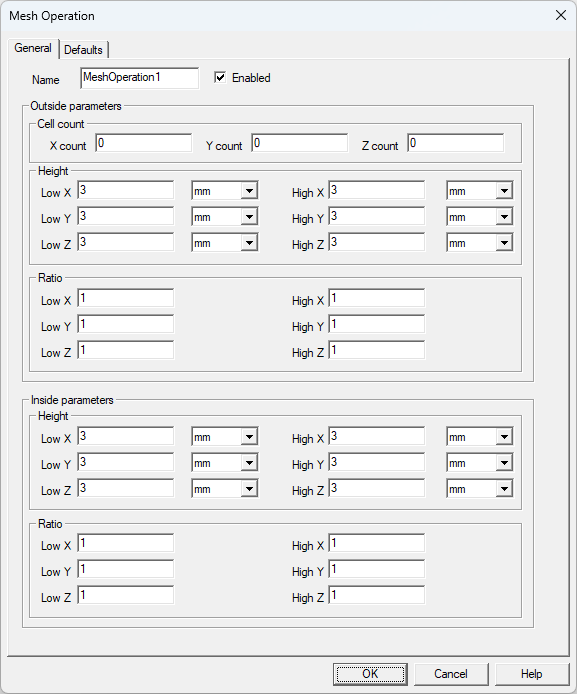
| Outside Parameters: Cell Count | |
|---|---|
| X count | X count specifies the number of elements along the X axis of the outer mesh region face. |
| Y count | Y count specifies the number of elements along the Y axis of the outer mesh region face. |
| Z count | Z count specifies the number of elements along the Z axis of the outer mesh region face. |
| Outside Parameters: Height | |
| Low X, Y, and Z | Low X, Y, and Z specifies the height of the first element on the low side surface of the mesh region in the direction normal to that surface, pointing outside of the mesh region. |
| High X, Y, and Z | High X, Y, and Z specifies the height of the first element on the high side surface of the mesh region in the direction normal to that surface, pointing outside of the mesh region. |
| Outside Parameters: Ratio | |
| Low X, Y, and Z | Low X, Y, and Z specifies the ratio of the height of a given element to the height of an adjacent element in the row one level nearer to the low side surface on the outside of the mesh region. Together with the height, this parameter controls mesh grading and density near the low side surface on the outside of the mesh region. |
| High X, Y, and Z | High X, Y, and Z specifies the ratio of the height of a given element to the height of an adjacent element in the row one level nearer to the high side surface on the outside of the mesh region. Together with the height, this parameter controls mesh grading and density near the high side surface on the outside of the mesh region. |
| Inside Parameters: Height | |
| Low X, Y, and Z | Low X, Y, and Z specifies the height of the first element on the low side surface of the mesh region in the direction normal to that surface, pointing inside of the mesh region. |
| High X, Y, and Z | High X, Y, and Z specifies the height of the first element on the high side surface of the mesh region in the direction normal to that surface, pointing inside of the mesh region. |
| Inside Parameters: Ratio | |
| Low X, Y, and Z | Low X, Y, and Z specifies the ratio of the height of a given element to the height of an adjacent element in the row one level nearer to the low side surface on the inside of the mesh region. Together with the height, this parameter controls mesh grading and density near the low side surface on the inside of the mesh region. |
| High X, Y, and Z | High X, Y, and Z specifies the ratio of the height of a given element to the height of an adjacent element in the row one level nearer to the high side surface on the inside of the mesh region. Together with the height, this parameter controls mesh grading and density near the high side surface on the inside of the mesh region. |