Creating a Mesh Size Region
Mesh size regions allow you to refine mesh locally in a region defined by a non-model box geometry. They allow you to specify refinement size along the X, Y, and Z coordinate directions. The mesher uses the following rules to refine the mesh.
- If the surrounding mesh region has multi-level mesh enabled, the solver applies the element sizes specified in the enclosed mesh size region. If multi-level mesh is disabled in the surrounding mesh region, the mesh size region settings are not applied.
- If the surrounding mesh region has multi-level mesh and uniform mesh parameters enabled, the solver applies the smallest element size specified in the enclosed mesh size region in all coordinate directions.
- If the surrounding mesh region has multi-level mesh enabled and uniform mesh parameters disabled, the solver applies the element sizes specified in the enclosed mesh size region.
- If a mesh size region is only partially enclosed within a mesh region, only the portion within the surrounding mesh region is meshed using the element sizes specified in the enclosed size region.
- The mesh size region must be axis-aligned with the surrounding mesh region. If the mesh size region is assigned to a box that is rotated with respect to the surrounding mesh region, the mesh size region settings are not applied.
Note:
To assign a mesh operation in the following procedure, the selected geometry must be a non-model box. That is, in the box geometry's properties, Model must be disabled. To assign a mesh operation that specifies per-object mesh levels, assign local mesh parameters, or reuse existing mesh, Model must be enabled. See Assigning Mesh Operations for more information.
- Press O to enter the object selection mode.
- In the 3D Modeler window or the history tree, right-click the geometry, and select Assign Mesh Operation.
Note:
You can assign the mesh size region to multiple non-model boxes. To do so, press and hold Ctrl and select multiple non-model boxes.
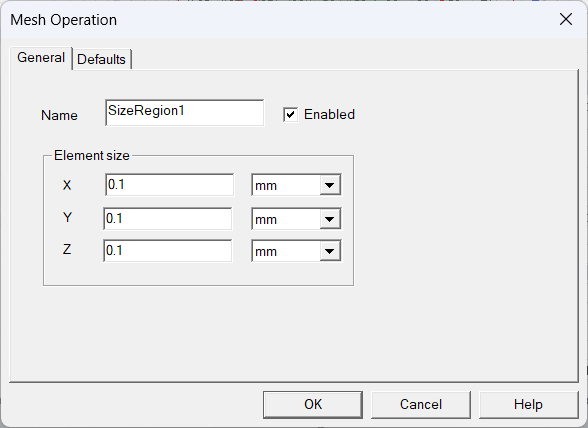
- Enter a Name for the mesh size region.
- Under Element Size, enter sizes for the X, Y, and Z coordinate directions.
- Select a unit for each coordinate direction.
- Click OK. The mesh operation is listed under Mesh > MeshOperation in the Project Manager.