
Monitor Visualization Options
Monitor information displayed in the 3D Modeler window can be enabled or disabled using the Monitor Visualization Options, which can be accessed from the Icepak>Monitor menu or by right-clicking Monitor in the Project Manager.
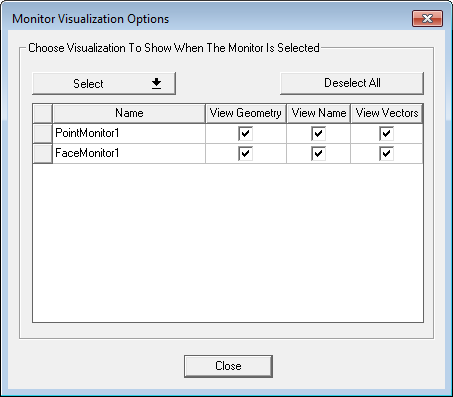
| Select | The Select drop-down contains options to select All monitors, All Face Monitors, or All Point Monitors. Select By Name to open the Select By Name dialog box in which you can enter a monitor name and click OK to select it. |
| Deselect All | Click Deselect All to deselect all face and point monitors. |
|
Name |
The Name of the monitor appears in the 3D Modeler window. |
| View Geometry | Enable View Geometry for the monitors for which you want to display geometry in the 3D Modeler. |
| View Name | Enable View Name for the monitors for which you want to display names in the 3D Modeler. |
| View Vectors | Enable View Vectors for the monitors for which you want to display vectors in the 3D Modeler. |
| Close | Click Close to close the Monitor Visualization Options dialog box. |