Open topic with navigation
Footprint View Menu
- Control the display by selecting the check box
of the following: Status Bar, Message Manager, Project Manager window,
Properties Window, Progress Window, Component Manager, Layout Window.
- Variables: View the project and design
variables with their values in a grid view.
- Rotate: click+drag to rotate the view; the same double-click options hold
true for the alt+drag editor display options.
- Change the zoom display by selecting one of
the following: Zoom In, Zoom Out, Zoom Area, Zoom Previous.
- Fit or Pan by selecting: Fit Drawing, Pan.
- Select Stretch Z to open the Set Layer Thickness Scale Factor window.
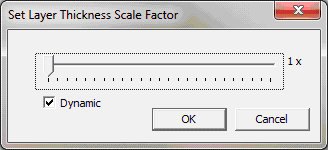
- Dragging the slider applies a Z scaling factor to the
current view. If Dynamic is selected, the scaling happens in real
time otherwise it is applied when OK is chosen.
Ansys Electromagnetics Suite 2025 R2 - © ANSYS, Inc. All rights reserved. - Contains proprietary and confidential information of ANSYS, Inc. and its subsidiaries and affiliates.
