
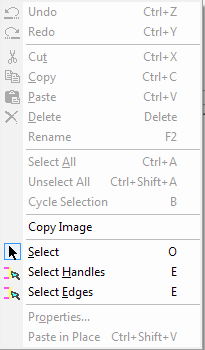
The fields on this menu become active as appropriate to the type of footprint being edited.
Undo<last edit operation> — Undo the last edit operation.
Redo<last edit operation> — Redo the last edit operation.
Cut – Delete the selected object, and retain a copy for pasting into a layout in the same application.
Copy – Create a local copy for pasting into a layout in the same application.
Paste – Put the object on the last cut or copy into the layout.
Delete – Delete the selected object without retaining a copy.
Rename – Click to rename the selected object in the layout.
Select All – Select all objects in the layout.
Unselect All – Unselect all objects in the layout.
Cycle Selection – Cycle selection of two or more objects that overlap. Each time you click Cycle Selection, a different one of the overlapping objects is selected.
Copy Image — Create a global copy of the selected objects on the clipboard for pasting into a different application.
Select – Sets cursor mode to selection of objects.
Select Handles – Sets cursor mode to selection of object handles.
Select Edges – Sets cursor mode to selection of object edges.
Properties – Opens the Properties window to view and edit the properties of the selected object.
Paste in Place – Paste object to same location, without any X,Y offset/displacement.